17 Jun 2026 · Updated 20 Sep 2026 · TubeCortex
What Is a YouTube Brain? Turning Channels Into Searchable Knowledge
A YouTube brain is a private, searchable copy of a channel's knowledge: it answers your questions from what the videos say, linked to the moments it used.
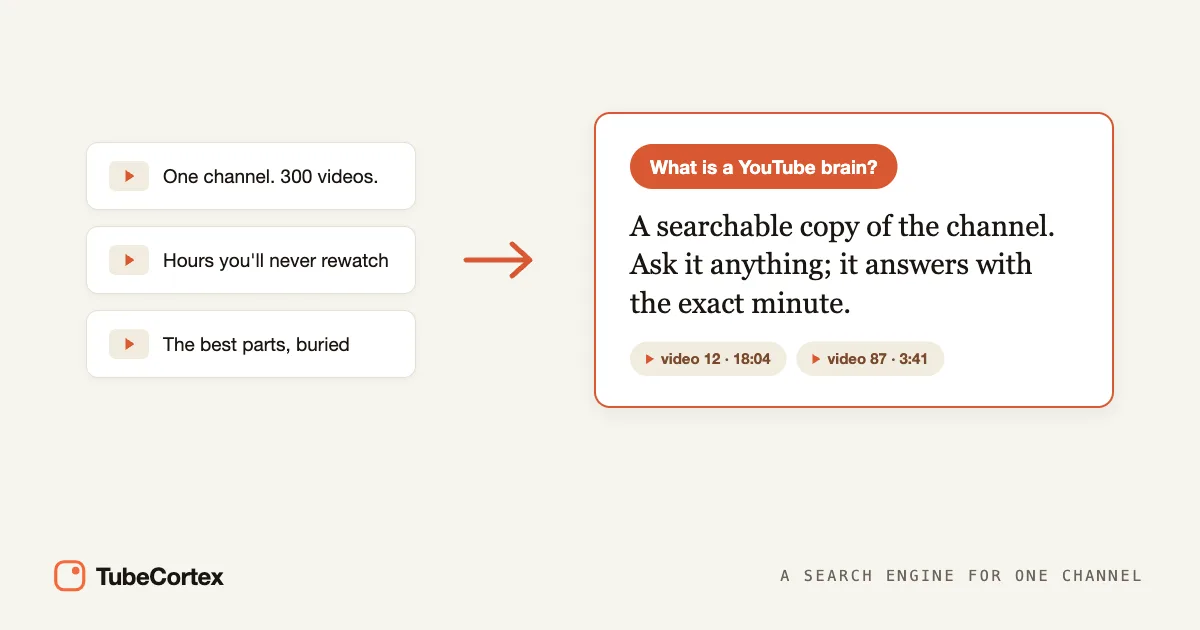
A YouTube brain is TubeCortex's answer to a problem every heavy YouTube user knows: the channels you trust hold hundreds of hours of spoken knowledge, and none of it is searchable. TubeCortex turns a channel or a set of videos into a private, searchable knowledge base, so you ask plain questions and get answers pulled straight from what the videos say, linked to the exact moments they came from. Sometimes called a YouTube brain AI, it works like a search engine that only looks inside the videos you gave it.
You follow more channels than you can keep up with, and the best parts are buried in hours you'll never rewatch. (Your Watch Later is basically a graveyard, right?) Instead of scrubbing a two-hour podcast for one point, you ask.
At a glance
| What it is | A private, searchable copy of a channel's knowledge, built from what its videos actually say |
| What it does | Answers your questions from the videos with citations, and compares channels |
| Best for | Students, researchers, marketers, solopreneurs, creators, teachers, and anyone who learns from YouTube |
| What you give it | A YouTube channel link, individual video links, or a playlist |
| What you get back | Cited answers and multi-channel comparisons, plus summaries and new-video alerts for channels you add to Autopilot |
| Cost to start | 2,500 free credits (dozens of full-length summaries), no card needed |
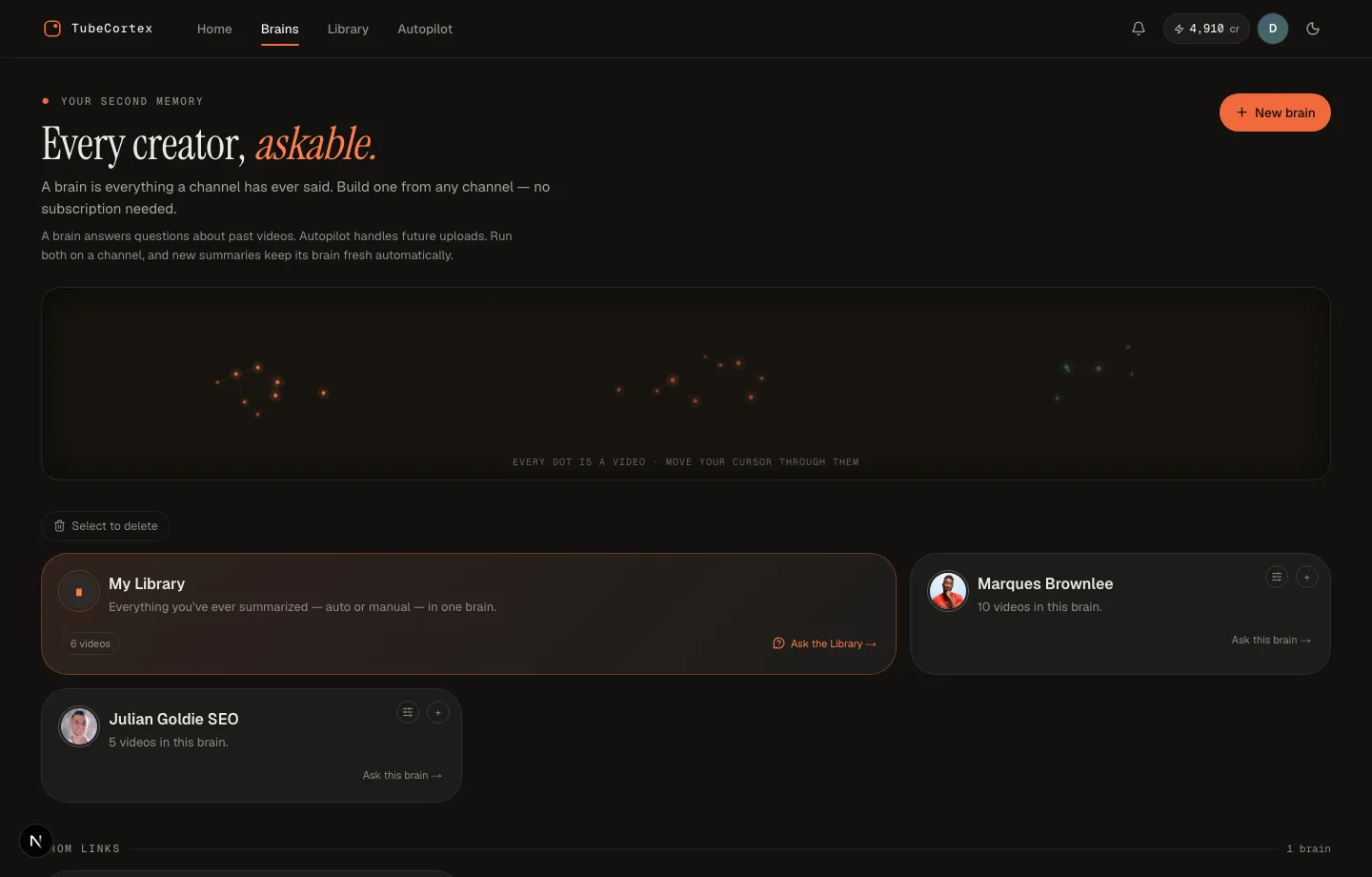 Each brain is a searchable memory of one channel, ready to answer your questions with sources.
What a YouTube brain actually is
Think of a reference librarian who has read every book on one specific shelf. Not the whole library, just that shelf, but every page of it. You don't browse the shelf yourself; you ask her, and she doesn't just answer, she pulls the book, opens it to the page, and points. A YouTube brain is that librarian for one channel. The shelf is the channel's videos. The page she points to is a timestamp.
That pointing part matters more than it sounds. A regular chatbot answers from everything it absorbed during training, which means it speaks confidently about your channel without having watched it. A brain answers from the videos you added. If they don't cover your question, it tells you so plainly, and any general background it adds is clearly labeled, with no timestamp. It would rather admit the videos don't say than pass a guess off as theirs, which is the part I'd care about most if I were studying from it.
TubeCortex builds these brains for you. You point it at a channel, pick the videos worth including, and a few minutes later the channel is something you query instead of watch.
How a YouTube brain works
Three things separate a brain from pasting a link into a regular chatbot.
The answers come from the video, not the model's memory
TubeCortex reads what is actually said in each video (its captions) and builds answers from that. This is what "grounded" means: each point is tied to a specific second of a specific video, so you can check it instead of wondering whether the tool made it up. Curious about the machinery underneath? Here's how AI summarizes and answers from a video, in plain language.
Every point from a video carries a citation
Each point taken from a video links back to that video and the timestamp it used, so you can check it in a click.
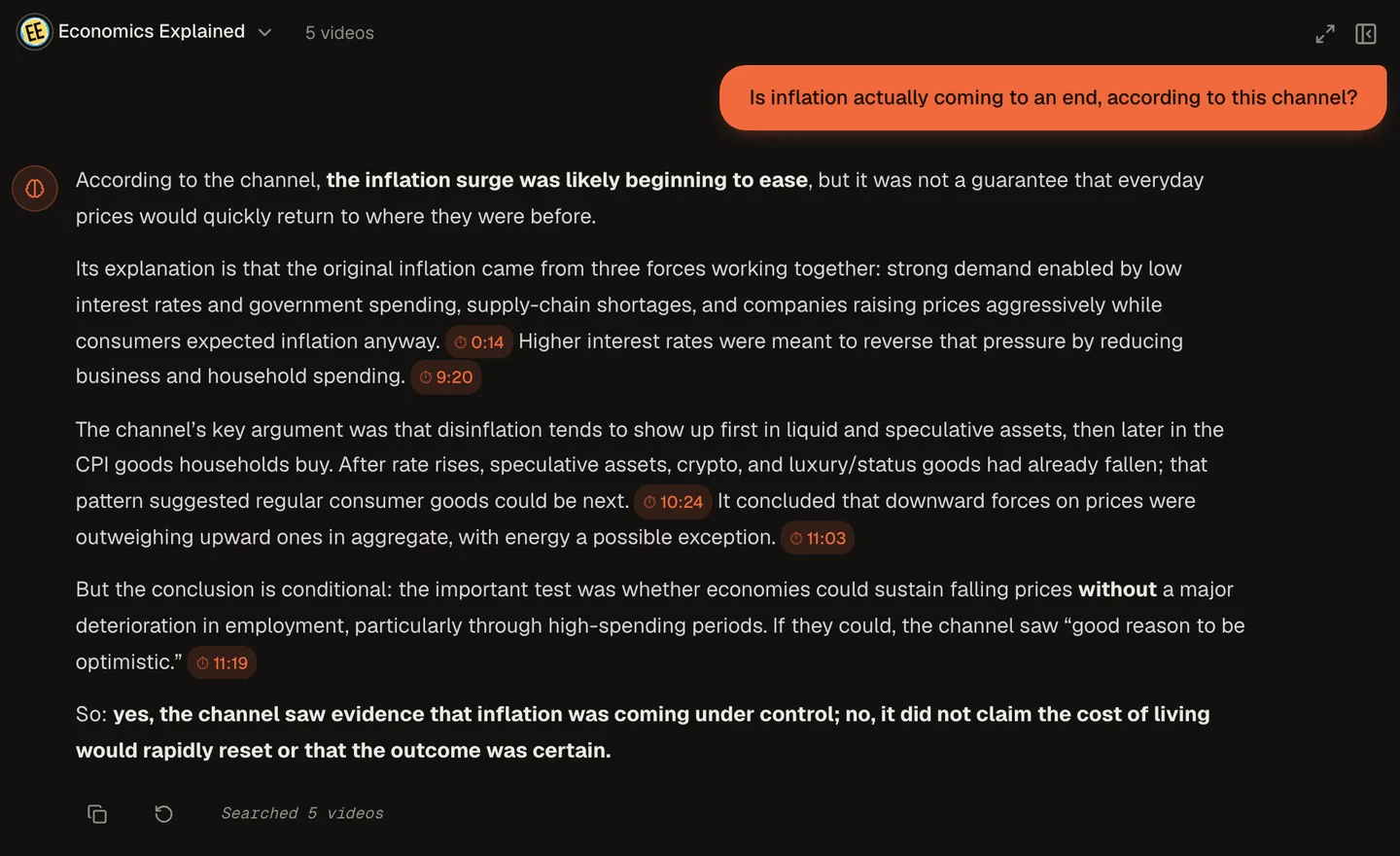 Each point taken from the videos carries a clickable timestamp, so you can jump to the exact moment it came from.
Here's a real one. We built a brain from five Economics Explained videos and asked, "Is inflation actually coming to an end, according to this channel?" The answer came back: the surge was likely beginning to ease, but nothing was guaranteed, with a timestamp chip after each point, like 10:24 for the channel's argument that falling prices show up first in speculative assets. Click a chip and the video jumps to that moment. That round trip, question to verified source, takes seconds.
It searches by meaning as well as words
A brain finds the moment that answers you even when the creator never used your exact words. Ask about "pricing" and it finds the part where they said "what it costs." So you don't have to remember how something was phrased, only roughly what it was about. That's also what makes a brain better than YouTube's own search box, which matches titles and descriptions, not the sentences spoken inside the videos.
Three kinds of brains you can build
TubeCortex gives you three ways in, depending on where your videos live.
A channel brain. Paste or search for a channel, then pick which of its videos the brain should hold, a recent slice or the whole back catalog. There's no price preview: each video you add uses a small number of credits, and videos you've already summarized are free to add. One channel brain holds one channel. This is the classic setup for a channel you learn from constantly. Here's how to build one in four steps.
A custom brain from video links. Paste individual video URLs from anywhere, five videos from five different channels if you like, and build a brain from exactly those. Handy when the topic matters more than the channel: five reviews of one product, one instant answer. You can add or remove videos later, so the brain grows with your research.
A playlist. Paste a real playlist link (the kind that starts with youtube.com/playlist?list=) into the video-links option and TubeCortex expands it into every video in the playlist. Students use this to turn a course playlist into searchable study notes.
Note: A playlist has to be public or unlisted for TubeCortex to read it. Private playlists, which is what YouTube creates by default when you save videos, can't be read from outside your account.
And there's a fourth brain you don't build at all: your Library. Every video you summarize in TubeCortex, by hand or automatically, lands in your Library, and the whole Library is askable as one pool. It fills up on its own as you use the app.
One question across five channels
Brains don't have to be questioned one at a time. Compare lets you ask a single question across up to five creator brains at once and get one answer, with every point labeled by the channel it came from.
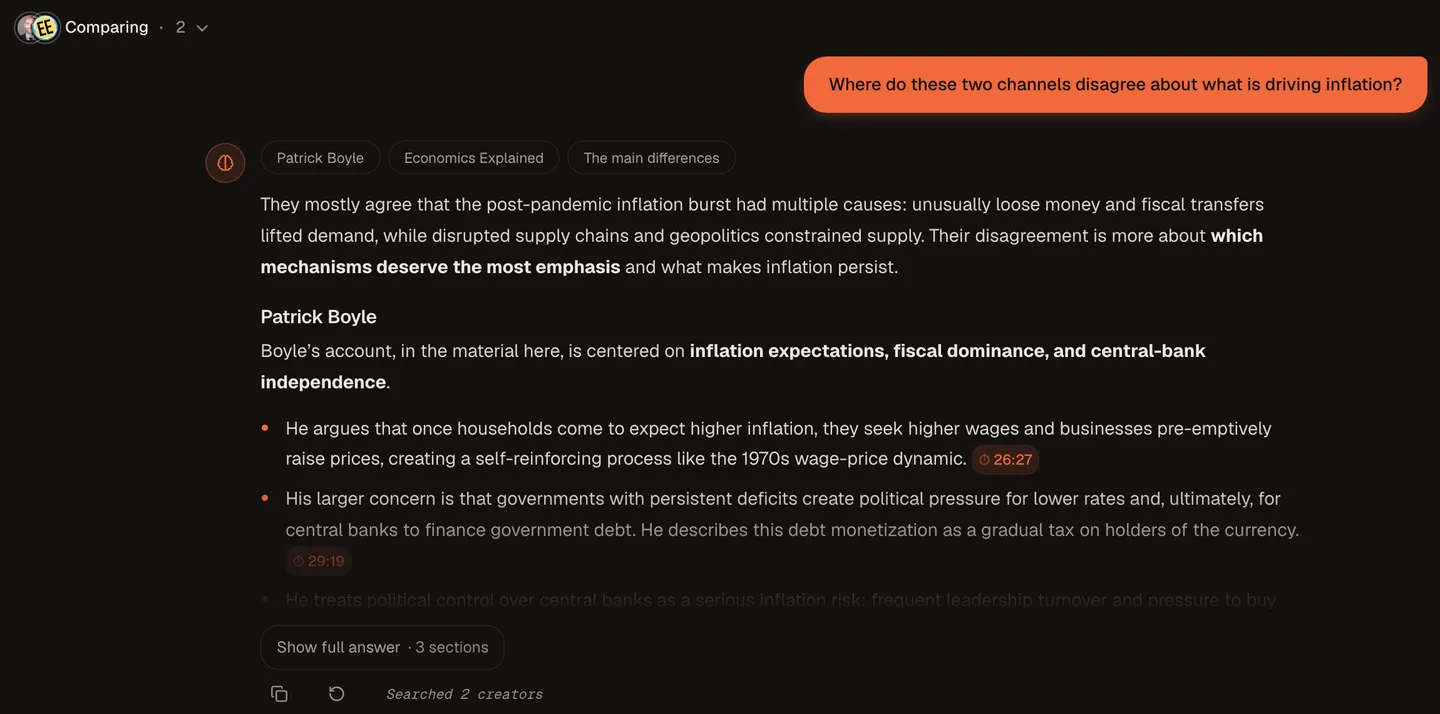 Compare asks one question across two to five channel brains and returns a single answer that labels each point with its channel.
That screenshot is a real Compare run: we asked "Where do these two channels disagree about what is driving inflation?" across the Patrick Boyle and Economics Explained brains. The answer opened with where the two channels mostly agree, then gave each channel its own section, with timestamps like 26:27 on Patrick Boyle's points. Reading it takes a minute or two. Watching both channels' inflation videos would take far longer, and you still wouldn't have the side-by-side. This is the feature marketers use to track competitor channels, and it's a big part of the TubeCortex vs ChatGPT vs NotebookLM comparison.
It keeps up so you don't have to
A brain covers a channel's past. For the future, you have two separate switches. Auto-update, on the brain's card, adds new uploads to the brain on their own. Autopilot writes the summaries: track the channel there, and TubeCortex summarizes its new uploads, each one using credits (it skips some, such as videos without captions, most very short videos, uploads that don't match your topics if you choose Only topics, and everything while Autopilot is paused or once your credits run out). The summary lands in your Library, and if you switch on Telegram for that channel, TubeCortex pings you with the video's title, the channel name, and a link to read the summary on-site. The ping is a doorbell, not a delivery; the summary itself stays in TubeCortex.
If your real problem is a subscription feed you can't keep up with, there's a whole guide on beating YouTube information overload.
What this looks like in practice
Say you're learning web development from a channel with 250 videos, each around 15 minutes. That's roughly 60 hours of watching. You'll realistically watch a fraction of it, and remember less.
Build a brain from that channel instead. The building runs on its own; you close the tab. From then on, "did they ever explain why my build is slow" is a 30-second question with a timestamped answer instead of a 40-minute scrub through three maybe-relevant videos. The hours you do spend watching go to the videos the brain showed you were worth it. You're not replacing watching. You're replacing searching.
How a brain differs from what you're doing now
You already have a system for YouTube knowledge; it's just not a good one. Here's the honest comparison.
| Your current tool | What it actually does | Where it fails you |
|---|---|---|
| Subscriptions | Tells you something new exists | Says nothing about what's inside, and the feed buries it within a day |
| Watch Later | Stores your intention to watch | Intentions don't answer questions, and the list only grows |
| YouTube search | Matches titles and descriptions | The sentence you need is spoken at minute 34 of a video whose title never mentions it |
| Your memory | Free, always with you | "I know they covered this somewhere" is not a citation |
A brain replaces none of these for entertainment; it replaces all of them for knowledge. Subscribing tells you a video exists, a brain tells you what it said. Watch Later stores videos, a brain answers from them. And unlike your memory, it never says "somewhere" when you ask where.
Who builds YouTube brains
One tool, five very different jobs:
- Students turn a course or lecture playlist into study notes they can question.
- Researchers and journalists pull quotes with a source attached, across dozens of videos at once.
- Marketers track competitor channels without watching every upload.
- Creators mine their own back catalog for ideas worth remaking.
- Busy people keep up with every channel they follow in minutes a day.
What a YouTube brain can't do
A brain only knows what is said in the videos you added, and honesty about that is worth a section.
Note: TubeCortex reads a video's captions. A video without them, like most music-only clips or silent demos, gives it nothing to work from.
Because it works from captions, it can miss something shown on screen but never said aloud, like a chart with no narration. It answers about the videos you added, not all of YouTube, so a topic nobody in your brains has covered simply isn't in there. And a channel brain picks up new uploads only when you add them or switch on Auto-update, which uses credits for each video it adds.
Five words you'll keep seeing, translated
You don't need any jargon to use TubeCortex, but these five words show up around every AI video tool, so here's what each one means in plain English.
Transcript. The words spoken in a video, written down. It's what a YouTube brain actually reads; the pixels never enter into it.
Grounded. A grounded answer is built from a real source it can show you, not from the model's general memory. Open-book, with the book on the table.
Citation. The receipt attached to a point in an answer: which video, which minute. In TubeCortex, points taken from the videos carry one, and clicking it jumps the player to that moment.
Brain. TubeCortex's word for one searchable knowledge base built from videos you chose, whether that's a channel, a hand-picked set of links, or a playlist.
Compare. Asking one question across several brains at once and getting a single answer that labels which channel said what.
Frequently asked questions
Are the answers really from the video, or made up? The answers come from the videos you added, not the AI's guesswork. Each point taken from a video cites the video and timestamp it used, and if your question isn't covered, the brain says so. Any general background it adds is clearly labeled and has no timestamp.
Can it answer across more than one channel at once? Yes. Build a brain per channel, then use Compare to ask one question across up to five of them. Each point is labeled with its channel, and the points taken from videos link to the moment.
Can I build a brain from videos that belong to different channels? Yes. A custom brain takes individual video links from anywhere, and you can add or remove videos later. A channel brain holds one channel; a custom brain holds whatever you paste into it.
Does it work with playlists? Yes. Paste a real playlist link and TubeCortex adds every video in it to a custom brain. The playlist needs to be public or unlisted, since a private playlist can't be read from outside your YouTube account.
How do I get updates without opening the app? Add the channel to Autopilot and switch on Telegram for it. When Autopilot summarizes a new upload, TubeCortex pings you with the video's title, the channel name, and a link to read the summary on-site. Each automatic summary uses credits, and an upload Autopilot skips sends no ping.
Is there a free plan? Yes. New accounts start with 2,500 free credits, enough for dozens of full-length video summaries, no credit card required. Get started for free.
Build your first brain
A YouTube brain turns channels you'd never finish watching into something you can simply ask. It answers from what the videos say and shows its sources, so your time goes to the answer instead of the search. Here's how to build one in four steps, or just paste a channel and ask. Get started for free
Keep reading
- How to build a brain from a YouTube channel in 4 steps
- You're using YouTube wrong: turn 5 videos into one instant answer
- YouTube playlist to study notes, searchable and cited
- How to summarize a YouTube video with AI
- How AI summarizes and answers from a video (RAG, explained simply)
- TubeCortex vs ChatGPT vs NotebookLM for YouTube research
- TubeCortex vs NotebookLM: why YouTube needs more than a notebook