18 Oct 2026 · TubeCortex
YouTube Research Tool: Skip the Watching, Keep the Answers
Use TubeCortex as a YouTube research tool: turn dozens of videos into one searchable brain, ask in plain English, and check each cited moment.
If you research topics for a living, YouTube is probably already part of your process. The problem is the watching. You find 30 relevant videos, sit down to get through them, and half a day disappears. TubeCortex is a YouTube research tool that replaces the watching part: you give it the videos and channels covering your topic, and then you ask questions instead of pressing play. Answers come from what is actually said in the videos, and each specific point carries a citation that jumps to the exact moment.
Think of it as having a research assistant who went through all 30 videos for you, took notes, and is now sitting next to you ready to answer whatever you ask.
Research setup at a glance
| Step | What you do | Time |
|---|---|---|
| 1 | Add videos to a custom brain, or build a brain from a channel | A few minutes |
| 2 | TubeCortex reads the captions of each video | Depends on how many videos you pick |
| 3 | Ask your research question in plain English | A short wait |
| 4 | Read the cited answer and follow the timestamp back to check it | Your call |
| Aspect | Detail |
|---|---|
| Best for | Researchers, journalists, academics, and independent analysts |
| What you give it | YouTube video links, a public or unlisted playlist link, or a channel link |
| What you get back | Plain-English answers with timestamps you can click |
| Why it beats notes by hand | You can ask follow-up questions instead of scrolling through a long document |
| Free to start | 2,500 free credits, no credit card needed. Get started for free |
How to research a topic across multiple YouTube videos
This is how you go from "I have a list of relevant channels and videos" to "I can ask this topic any question I want."
1. Collect your sources
Start with a list of channels or specific videos that cover the topic you're researching. A channel brain holds one channel, so for a cross-channel view you'll either build a brain per channel and use Compare to ask across them, or put videos from different creators into one custom brain.
Don't try to cram everything in on day one. Start with one channel or one set of specific videos. You can broaden from there.
Only have a handful of videos? Here's the quick five-video version. Want every click of the build explained? See how to build a brain from a YouTube channel.
2. Build your first research brain
On the Brains page, click New brain (or Create your first brain, if it's your first). Stay on From a channel, type the creator's name, and click Build next to the right channel (or paste the channel link and click Build from this link). Tick the videos that belong in the brain, a handful or the whole catalog, and click Add to brain. Videos you've already summarized are marked free. TubeCortex then reads the captions of each video and turns them into a searchable brain. No spreadsheet. No watching.
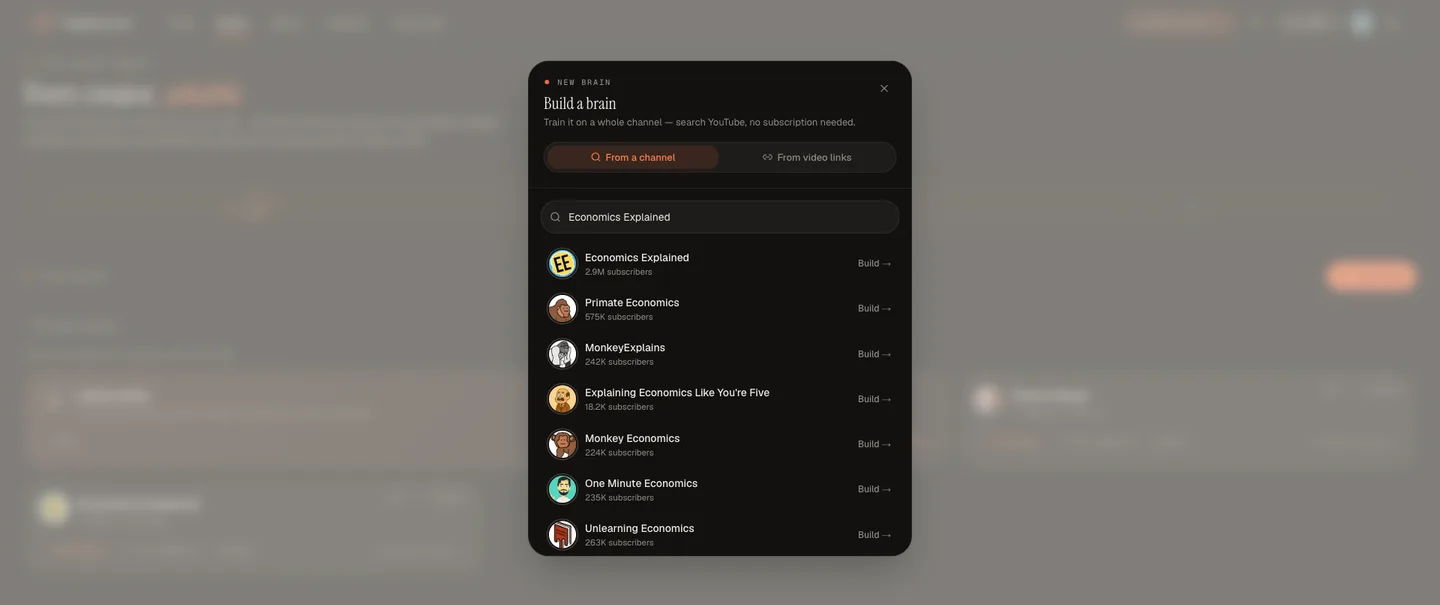
In the Build a brain window, the From a channel tab searches YouTube channels by name and shows a Build button beside each result.
If your research needs videos from several channels, build one brain per channel. Compare, explained below, lets you ask up to five of them at once. Or switch to From video links and paste videos from different creators into one custom brain.
3. Let TubeCortex process what the videos say
This is the part that would have taken you hours. TubeCortex reads each video's captions and files every passage, like a librarian sorting index cards, so it can find the right moment when you ask. It doesn't write a summary of each video (it doesn't need one to answer you). You can walk away: the build keeps going if you close the window.
How long it takes depends on how many videos you picked. A progress bar shows how many videos are in and how many credits the build has used so far. If you start another build while one is running, it waits its turn. Grab a coffee.
When it's finished, the Manage button on a channel brain's card shows you what's inside.
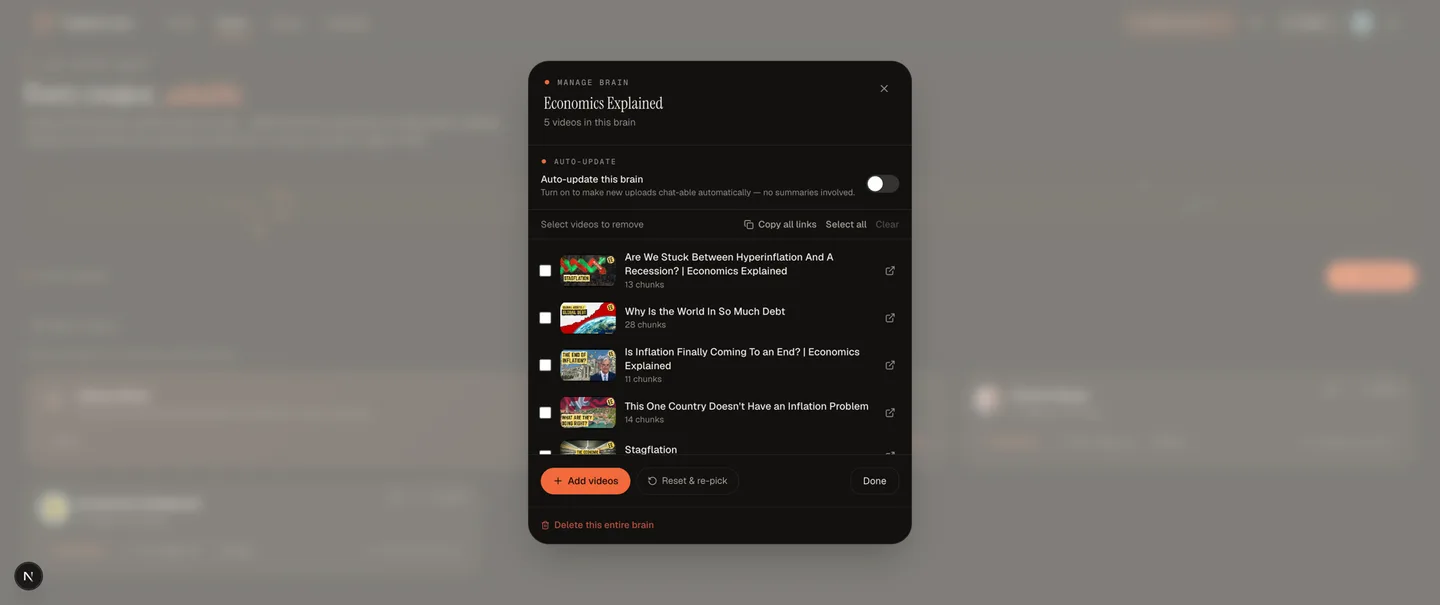
The Manage brain window for an Economics Explained brain lists its five videos by title, with an Auto-update switch above the list and an Add videos button below it.
4. Ask your research question
Now you get to the reason this beats watching. Click the brain's card on the Brains page and ask a question in plain English, the way you'd ask a colleague who's read up on the topic. You get a cited answer back.
| Research question | What makes it work |
|---|---|
| "What arguments do experts on this channel make about X?" | Pulls recurring themes and attributes them |
| "Has the host ever changed their position on this topic?" | In a channel brain, every quoted passage carries its video's upload date, so shifts show up |
| "What sources and names does this channel mention?" | Finds the passages where they cite or debate someone |
| "What do these videos say about this subtopic?" | Narrows a large channel to just what you need |
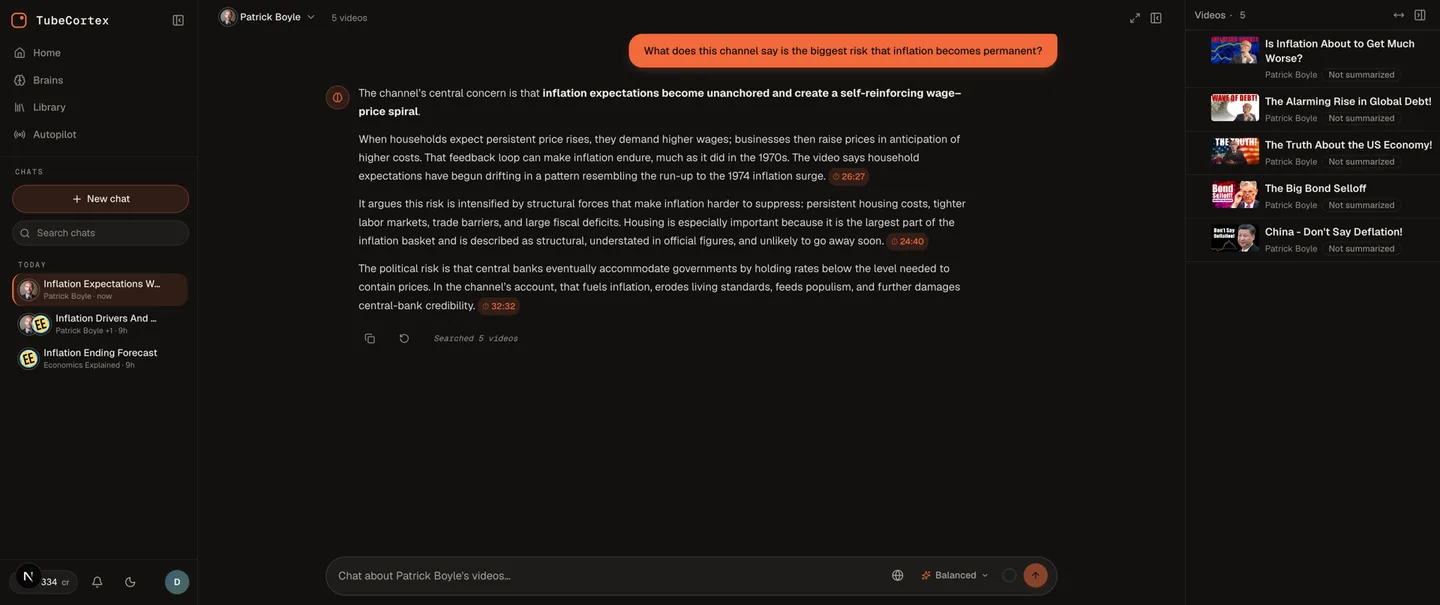
A brain chat for Patrick Boyle's channel answers one question about inflation. Each supporting paragraph ends in a small timestamp chip, and the brain's five videos are listed on the right.
Cited points end in a small timestamp chip. Click one and the video opens at that moment next to the chat, so you can check the claim yourself. That's the whole point. You're reading a cited source, one click from the original.
Step 4 is the one you'll actually use every day. The brain is the setup. This is the payoff.
How TubeCortex actually pulls answers from video
Here's what happens under the hood, in plain words.
Where the answers come from
Imagine you highlighted everything relevant in a book and could now type a question into those highlights. That's the shape of what TubeCortex does. It reads what is said in each video. The answers come from the actual words spoken.
That matters for research, because you can check each cited claim at the source.
Why answers come with citations
A citation in TubeCortex is a link back to the exact video and the exact moment in that video where a point comes from. Click it and you can hear it yourself.
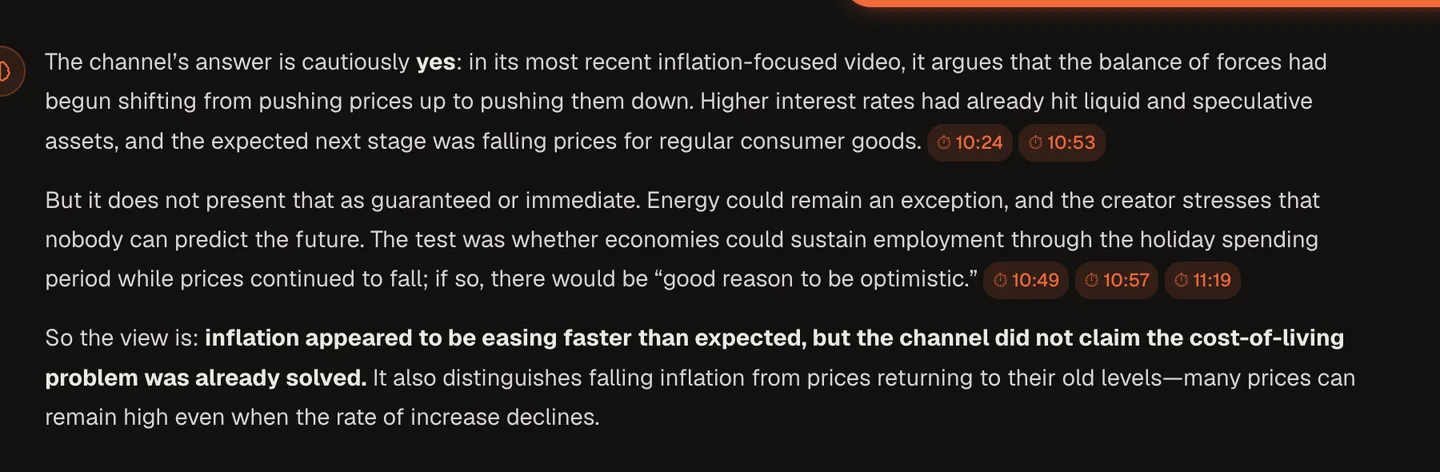
A close-up of one answer. Its bold summary line reads: "inflation appeared to be easing faster than expected, but the channel did not claim the cost-of-living problem was already solved." Timestamp chips such as 10:24 and 11:19 sit at the end of the cited sentences.
For any serious research, being able to check is what makes it usable. An answer you can't check isn't a research finding. It's a note you'll have to go back and verify anyway.
How asking across multiple channels works
If your topic spans several channels, you build one brain per channel, then use TubeCortex's Compare feature. On the Brains page, tick Compare on two to five channel brains and click Chat with all. You ask one question and get one answer that draws from every brain you picked.
It's like asking the same question in a few different rooms at once, then getting one write-up of what each room said, with each point tied back to the room it came from.
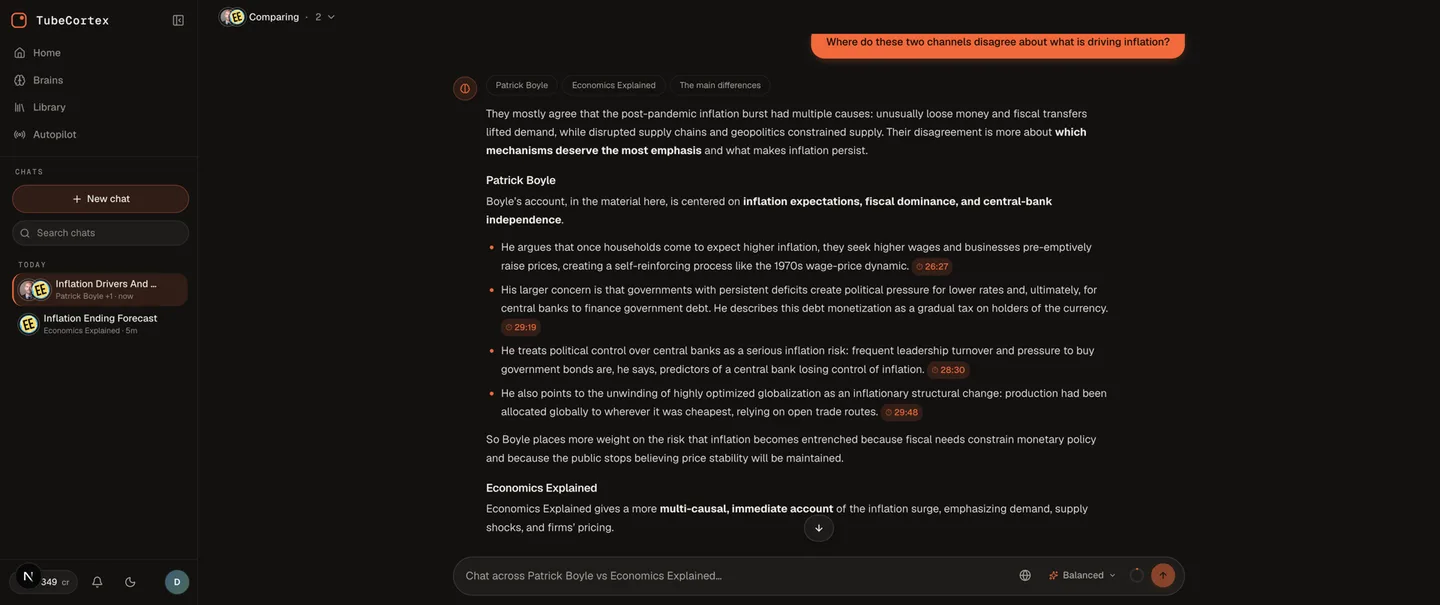
Two channel brains, Patrick Boyle and Economics Explained, are open in Compare. The question at the top asks where the two channels disagree about what is driving inflation, and the answer gives each channel its own section, with timestamp chips on Patrick Boyle's points.
What this looks like in practice
Say you're researching how independent economists talk about inflation on YouTube. You find five channels. Together they have about 200 videos. If the average video runs about 36 minutes, watching all 200 at 1.5x speed takes roughly 80 hours.
With TubeCortex:
- Build one brain per channel. Five channels, five brains.
- On the Brains page, tick Compare on all five and ask: "What are the main differences in how these economists explain inflation? What do they agree on?"
- Get one cited answer that covers all five channels, with timestamps you can check.
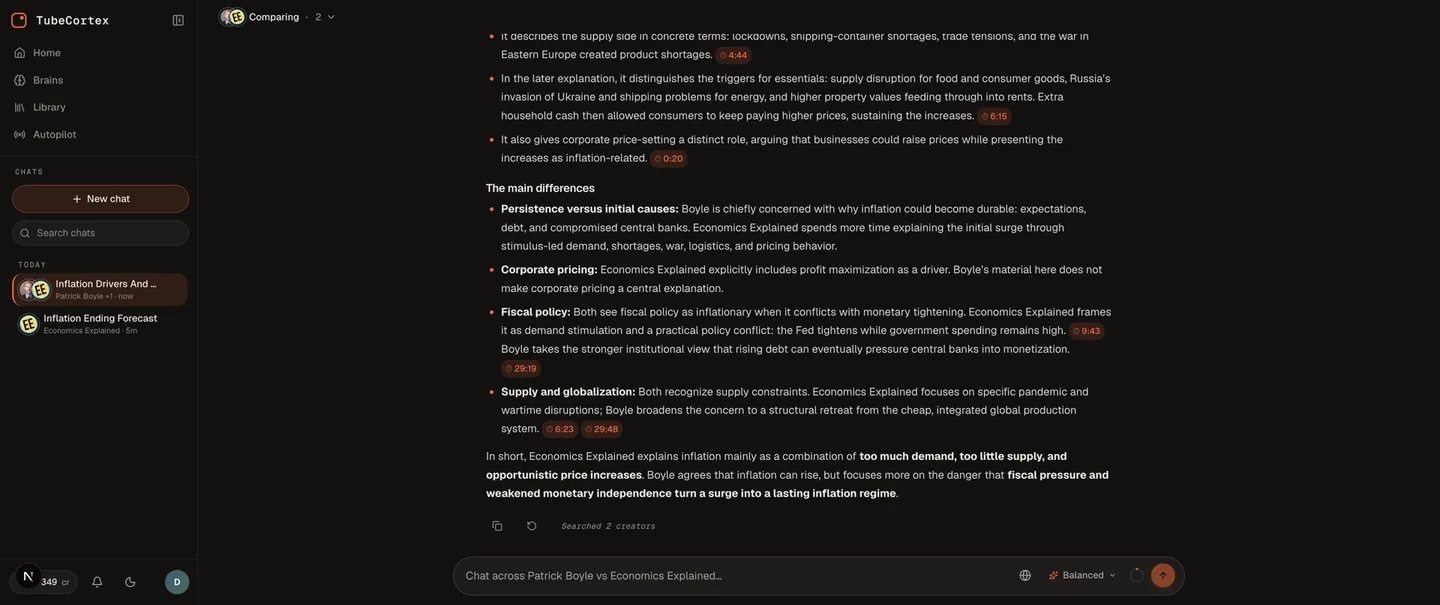
Further down the same two-channel Compare answer shown earlier, a section called The main differences sets the channels side by side on persistence, corporate pricing, fiscal policy, and supply and globalization.
The 80 hours of watching turns into a few minutes of picking videos, a wait while the brains build (they go one after another, and you don't have to stay), and a short wait for each answer. You still do the analysis. You still write the conclusion. TubeCortex does the watching and the pointing.
A real research question to try:
"Has the framing around this topic changed across videos published before and after a major event? Show me examples with timestamps."
That kind of question is close to impossible to answer by skimming titles. Ask it in one channel's own brain, which can answer it because every passage it quotes there carries its video's upload date. In Compare and custom brains, the passages don't carry those dates.
Other ways to use this
This post is written for researchers, journalists, and academics. But the same workflow works in other directions:
- Marketers can use Compare to track what competitor channels say about a product category.
- Students can build study brains from lecture playlists (the playlist has to be public or unlisted) and ask questions across the course.
- Creators can use it to mine their own channel's back catalog for ideas and recurring themes.
Each of those deserves its own guide. This one is for you: a topic, a set of sources, and a need for answers you can check without watching everything twice.
What TubeCortex can and can't do
Note: TubeCortex reads a video's captions or transcript, so it needs a video that has one. Most interviews, lectures, and commentary videos do. A video with clear narration but no captions won't work, and neither will a music-only compilation.
Note: A channel brain holds exactly one channel. To research across several channels, build one brain per channel and use Compare, which takes up to five brains at a time. For more than that in one answer, paste the videos you need into a single custom brain instead.
Note: TubeCortex answers from what is said in the videos. If they don't cover your question, it says so plainly, and any general background it adds is labeled as its own, with no video citation.
Frequently asked questions
What is the best YouTube research tool for going across many videos?
TubeCortex is a YouTube research tool that lets you build searchable brains from channels and specific videos, ask questions in plain English, and get answers whose points link back to the exact video and moment they came from. It's built for going across many videos at once.
Can I ask a question across multiple YouTube channels at once?
Yes. Build one brain per channel in TubeCortex, tick Compare on each brain's card on the Brains page (up to five), then ask one question across all of them at the same time. You get a single answer that draws from each channel and names which channel each point came from. You can also paste video links from different creators into one custom brain and ask that.
Are the answers actually from the videos, or is TubeCortex guessing?
TubeCortex answers from what is said in the videos, not from a model's guess about what the videos are probably about. Specific points carry a timestamped citation you can click to check that moment in the original video. If the videos don't cover your question, TubeCortex says so, and any general background it adds is labeled as its own, with no video citation.
How many videos can I research at once?
A TubeCortex brain can hold dozens of videos, and far more than that. A channel brain holds the videos you pick from one channel's catalog, from a handful to the full back catalog. A custom brain lets you add specific videos from different channels, or a whole public or unlisted playlist, and the new-brain window tells you if a paste goes past what one brain holds. Either way, you can add or remove videos later, and Compare lets you ask up to five channel brains at once.
Does it work on any YouTube video?
TubeCortex works on videos that have captions or a transcript available. Most talk-format videos, interviews, lectures, podcasts, and commentary channels work well. Silent tutorials, background-music compilations, and purely visual content usually have no caption track to go on.
Is there a free way to try this research workflow?
Yes. Every new account starts with 2,500 free credits, no credit card required. Building a brain spends some of those credits, and asking a brain questions on the TubeCortex Free tier spends none, so you can build your first research brain and try the full workflow before you pay anything. Start your first research brain free
Recap
Research across YouTube doesn't have to mean watching everything. TubeCortex turns the channels and videos on your topic into searchable brains you can ask questions about, with each specific point tied back to a video and a timestamp. Asking replaces the watching.
Start researching your topic in TubeCortex