4 Oct 2026 · TubeCortex
How Does an AI Video Summarizer Work? RAG, Explained Simply
How does an AI video summarizer work? TubeCortex reads a video's captions, summarizes the whole transcript, and answers questions with clickable timestamps.
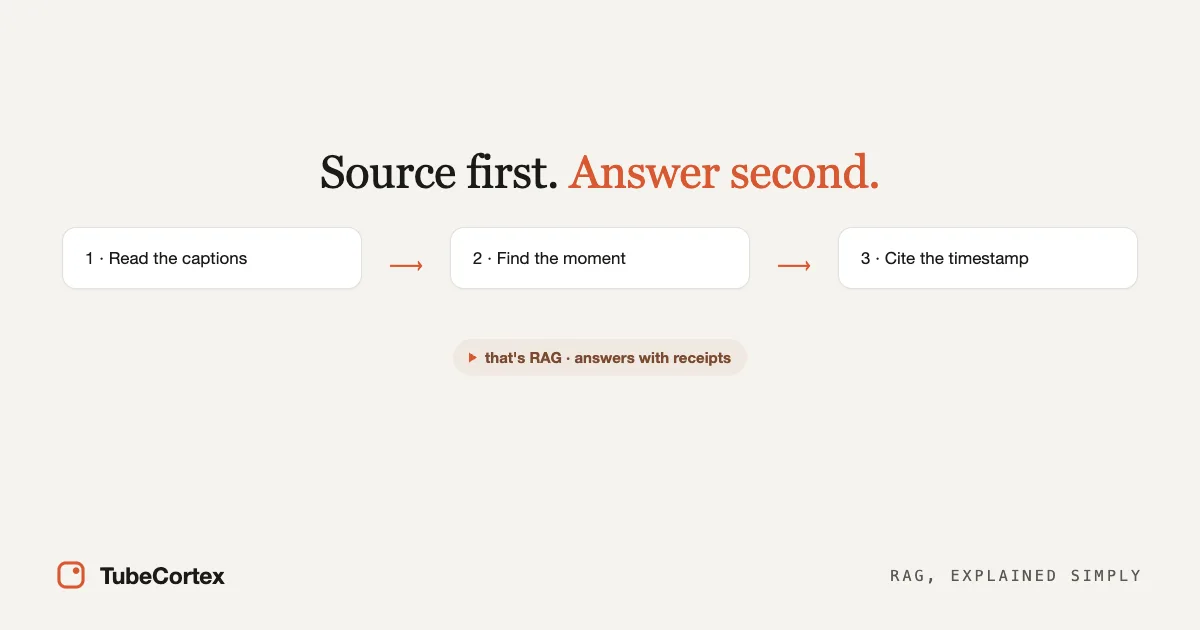
How does an AI video summarizer work? TubeCortex reads a video's captions, the transcript YouTube already has, not the picture or the sound. For a summary, it gives the AI the whole transcript and asks for a write-up with clickable timestamps. For a question, it first finds the few passages that match what you asked, writes the answer from them, and cites the moment each point came from. That second trick is called RAG, short for retrieval-augmented generation, and it's the difference between an answer with a receipt and an answer that just sounds right. This page explains both in plain English, no computer science required.
At a glance
| Aspect | Detail |
|---|---|
| What RAG means | Retrieval-augmented generation: find the relevant part first, then answer from it |
| What it works from | The video's captions (its transcript), not the picture or the sound |
| Summary vs. question | A summary reads the whole transcript. A question searches for the matching passages first |
| Why it cites a timestamp | So you can check the answer at its source in one click |
| What it's built to avoid | Making up what your videos say, which is where wrong answers come from |
| When your videos don't cover it | It tells you so. Anything added from general knowledge is labeled and has no timestamp |
| Try it | Paste a video or channel and ask a question. Get started for free |
The closed-book problem
Picture two students taking the same exam. The first one studied months ago and answers from memory. Most answers are right. Some are confidently, fluently wrong, and you can't tell which, because both kinds sound identical.
That first student is a regular chatbot. It answers from everything it absorbed during training. Ask it about a specific YouTube video it can't open, and it either tells you it can't see the video or writes something plausible about what that video probably says. Plausible is the problem. An answer that's wrong in an obvious way is annoying; an answer that's wrong in a convincing way sticks with you. This is the core difference explored in TubeCortex vs ChatGPT vs NotebookLM. In our own test in September 2026, free ChatGPT couldn't read a video from its link. When it can't read the video and you don't paste the transcript in yourself, it's left answering like the closed-book student.
RAG is the open-book exam
The second student gets to bring the textbook. Before answering, she finds the right page, reads it, and answers from what's in front of her, with the page number in the margin.
That's RAG. Before the AI writes anything, it finds the passages that relate to your question, then writes the answer from them. Source first, answer second, which is why a RAG answer can show its work. RAG is a general technique (AWS has a clear plain-English explainer); TubeCortex applies it to video, where "the textbook" is the captions of the videos you added.
First, how a plain summary gets made
A summary doesn't need the search step. When you summarize a video, TubeCortex hands the AI the video's whole transcript, with a time marker on every line, and asks for a write-up in the format you picked. The AI is told to copy those time markers exactly, and TubeCortex then checks each timestamp against the transcript, moving one that's slightly off to a moment that really exists. If a transcript is too long to fit, TubeCortex tells you so instead of summarizing half of it.
Questions work differently. A question only needs the few moments that answer it, and it might need them from a whole channel. That's where RAG comes in.
How it answers a question, in three steps
1. It reads the video's captions
First, TubeCortex fetches the video's captions, the transcript YouTube already has for it. It doesn't process the audio or watch the picture; it reads that text, with a time marker on every line. That's why it can quote exact lines and point to the moment they were said. It's also why a chart that's only shown on screen is invisible to it, and why a video with its captions switched off gives it nothing to read.
2. It finds the moments that match your question
For most questions, TubeCortex doesn't reread the whole transcript. Ahead of time, it cuts the captions into short passages, like a deck of index cards, each one remembering which video and which moment it came from. When you ask something, it usually tidies your question into a clean search phrase first. Then it looks for passages that mean the same thing as your question. When you ask across your whole Library or a bigger channel brain, it also runs a plain word search for passages that use the same words, and blends the two sets of results. Ask about "pricing" and it can find where the creator said "what it costs," even though no word matched. You don't have to remember how something was phrased, only what it was about.
3. It writes the answer from those passages, and attaches the receipt
Only now does the AI write. For anything about what a video says, it's told that the passages it found are the evidence, and each point it takes from them carries a citation with the timestamp of the line it came from. It also gets some background, like a short overview of the channel and what you've already said in the chat, but it's told not to put timestamps on that background.
If nothing in your videos covers the question, TubeCortex says plainly that your videos don't cover it. It may then add a general answer, which it's told to label as general knowledge and leave without timestamps. That honesty is a feature. A plain "your videos don't cover this" beats a fluent guess.
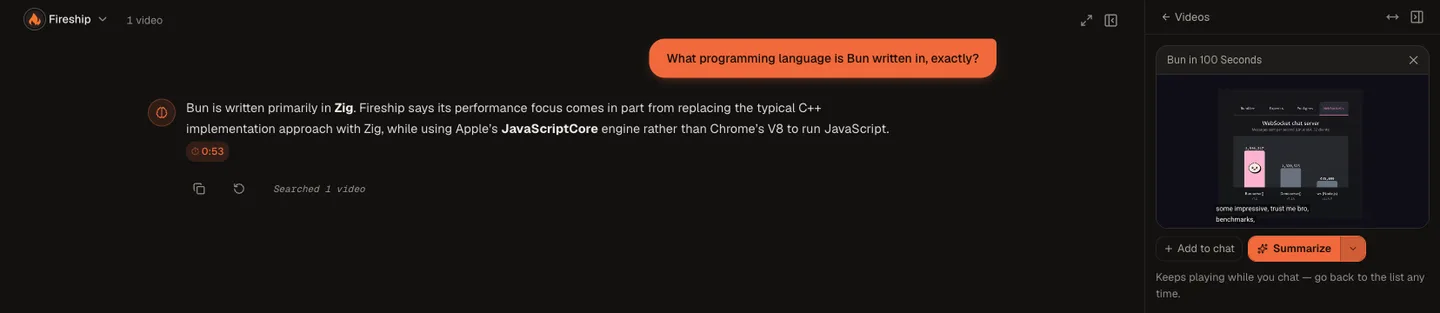 The answer's 0:53 timestamp chip, with the source video in the built-in player beside it. Clicking a chip moves the player to that moment.
That screenshot is a real run, not a mock-up. In September 2026 we built a brain from the Fireship channel's "Bun in 100 Seconds" video and asked, "What programming language is Bun written in, exactly?" The answer said Bun is written primarily in Zig, gave the reasoning from the video, and carried a timestamp chip reading 0:53. Click that chip and the player starts a few seconds before the creator mentions Zig. Question, answer, and a check against the source, all without leaving the chat.
One question, start to finish
Let's run that Bun question through all three steps slowly, because seeing it once makes the whole idea click.
You type: "What programming language is Bun written in, exactly?"
The search kicks in first. TubeCortex looks through the brain's index cards for passages that relate to your question. The video never says the phrase "written in"; what the creator actually says is that Bun swaps out C++ for Zig. A word-matching search on its own would sail right past that. The meaning search catches it, because "what language is it written in" and "swapping out C++ for Zig" are about the same thing, just phrased differently.
The passages get handed to the writer. The AI receives your question plus the passages it found, each with its video and timestamp attached, and instructions that amount to: for anything the video says, answer from these and cite them.
The answer comes back wearing its receipt. In our run, that meant "Bun is written primarily in Zig," the video's reasoning, and the 0:53 chip. What matters is what the answer is built from: the passage where the creator says it, not the AI's memory of every blog post ever written about Bun. The narrow scope is the feature.
The three ways a video answer can go wrong
Being honest about failure modes is more useful than pretending there aren't any. There are three, and RAG goes straight at the first one.
The model invents something. This is the closed-book failure, and it's the one RAG is built to fight: the answer is written from the passages TubeCortex found, and the citation lets you catch anything that slipped.
The search misses. Sometimes the relevant moment exists but isn't found, usually when a question is phrased very differently from anything said in the videos. The honest symptom is a "your videos don't cover this" answer for something you're sure was covered. Rephrase the question closer to the topic's own vocabulary and it usually surfaces.
The words themselves are wrong. Captions can mishear a technical term (when we first tried this in July 2026, the stored transcript spelled Zig as "Zigg" in one spot, and the answer pointed that out). The timestamp is your safety net here too. Click it, listen, and you hear the actual word instead of trusting the caption.
The timestamp is how you catch the first and third kinds in seconds: click it and check. A search miss leaves nothing to click, which is why rephrasing is the fix there. A system that doesn't show its sources gives you no way to check any of them.
Why the timestamp is the whole point
Plenty of tools can produce a summary. Trusting it is the hard part, and the timestamp is how a tool earns that trust. When a TubeCortex answer tells you what a video says, it's built to link each point to the moment it came from, so instead of taking the AI's word, you click and hear the creator say it themselves. For anything you'd act on, like a quote in an article or an exam answer, that one click is the difference between "the AI said so" and "I checked."
There's a quieter benefit too. Once you're used to claims about a video carrying a visible receipt, a claim without one stands out, and that's the claim to check before you rely on it.
What this unlocks once it works
Answers tied to one video's own words are useful. The same machinery, pointed at more videos, is where it gets interesting.
- A whole channel becomes askable. Build a brain from a channel and your answers draw on whichever of its videos are relevant, naming the video and the moment. That's what a YouTube brain is.
- Channels can be compared. Compare runs one question across up to five channel brains and returns one answer that names which channel each point came from, which is how researchers cover dozens of videos and marketers track competitors without watching them.
- Your summaries stay askable. Each summary you make lands in your Library, and you can ask one question across your whole Library at once.
Where RAG runs out
RAG is only as good as the words it has to work with, so the limits are exactly where the words stop.
Note: No captions, no answer. TubeCortex reads a video's captions, so a video with its captions switched off gives it nothing to read, however clear the narration. A music-only video or a silent screen demo usually has no useful captions either.
It can also miss anything shown on screen but missing from the captions, like an unlabeled chart or text on a slide nobody reads aloud. And it answers about the videos you've added, not all of YouTube. That's the honest boundary of working from captions.
When you don't need RAG at all
Fair's fair: not every question deserves this machinery. If you want to know what recursion is, any chatbot answers well from training memory, because a million textbooks agree on it. Closed-book works fine when the answer is common knowledge and the cost of being subtly wrong is low.
RAG earns its keep when the answer lives in a specific place: what did this creator say, or did this channel change its position. Nobody's training data contains last week's uploads from the channels you follow. For those questions there's no substitute for actually reading the source, which is the entire trick.
Do I need my own AI account for this?
No. TubeCortex runs the AI for you, so there's no separate AI account to set up. New accounts get 2,500 free credits (dozens of full-length summaries), no card needed. TubeCortex Free, the built-in free engine, also keeps manual summaries and chat with your brains and Library working after those credits run out.
Frequently asked questions
What is RAG in simple terms?
RAG (retrieval-augmented generation) means the AI finds the relevant source first, then writes its answer from it, like an open-book exam instead of answering from memory. For video, TubeCortex finds the passages in a video's captions that match your question, answers from them, and cites the moment each point came from.
Does the AI actually understand the video?
TubeCortex works from the video's captions, the written transcript, not the moving pictures or the audio. That's why it can quote exact lines, and also why it can miss something that's only shown on screen.
Can an AI that cites its sources still make things up?
Yes, an AI that cites its sources can still get things wrong, but the mistakes are much easier to catch. TubeCortex writes from passages it found in your videos and links each point to its moment, so you can check it in one click. If your videos don't cover the question, it says so plainly, and anything it adds from general knowledge is labeled that way.
Does the video need captions or a transcript?
Yes, TubeCortex needs a video that has captions or a transcript available. Many talk-style videos have them, often generated by YouTube, but a creator can switch them off, and a video with no caption track gives TubeCortex nothing to read, however clear the narration.
Does every answer come with a timestamp?
No, only the points taken from your videos carry a timestamp. When TubeCortex tells you what a video says, it links that point to its moment. An answer about which videos to watch links whole videos instead, and anything the AI adds from general knowledge is labeled that way and has no timestamp, so you can tell it didn't come from your videos. Now and then a citation also comes out garbled and doesn't turn into a clickable chip.
Can I ask in a language other than English?
Yes, you can ask in another language, and TubeCortex is set up to answer in the language you ask in. The video still needs captions, and a word-for-word quote keeps the video's own wording.
Is it free to try?
Yes. New accounts get 2,500 free credits, dozens of full-length video summaries, with no credit card required. Get started for free.
Try it on a real video
RAG is just a sensible order of operations: find the source, answer from it, cite it. That's the whole mechanism. The quickest way to really get it is to watch it happen: paste a video or a channel, ask one question, and click the timestamp that comes back. Get started for free.