15 Nov 2026 · TubeCortex
YouTube Channel Transcript Search: Find the Minute It Was Said
Search the words spoken across a channel's videos and get the video and the minute, with a timestamp you can click. Built from the channel you already watch.
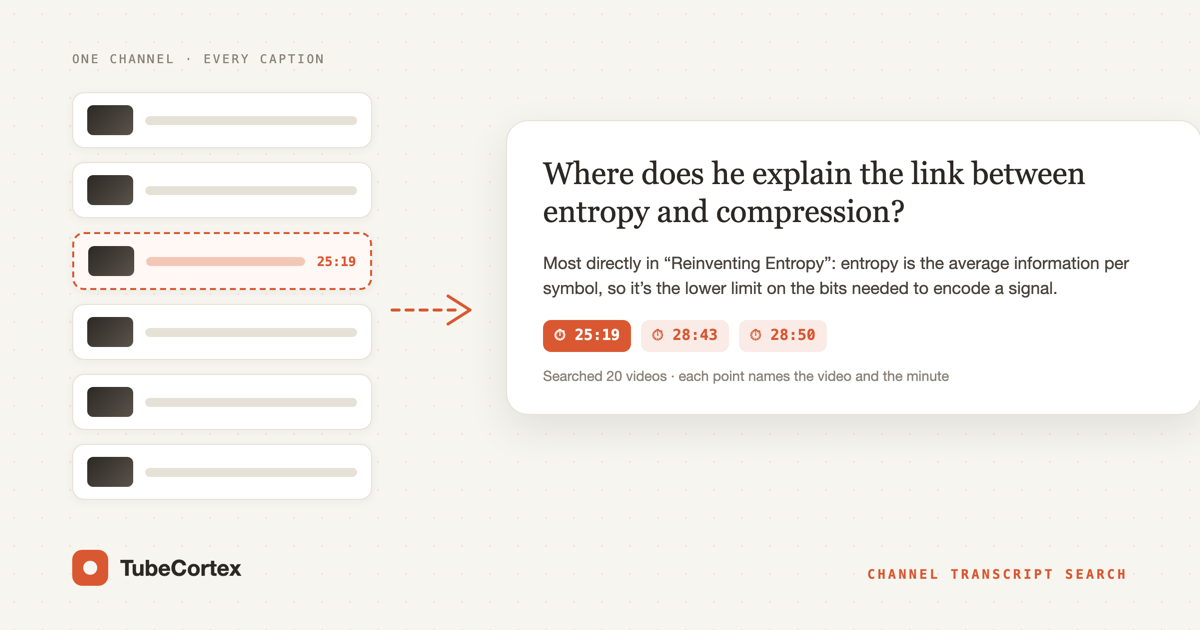
You remember a creator explaining something, but not in which video, and YouTube's search box hands you videos, not moments. A YouTube channel transcript search reads the captions of every video you add from a channel and points you to the exact minute a thing was said. TubeCortex builds that search as a "brain" from the channel's captions: you pick the videos, ask a question in plain English, and each point it takes from the videos comes back with the video's name and a clickable timestamp. In our one test, a brain built from 20 of 3Blue1Brown's videos was ready eight seconds after we pressed Add to brain, and the first answer came back in 18 seconds with six timestamps across the two videos it named.
Channel transcript search at a glance
| What it does | Searches the words spoken in a channel's videos and answers with the video and the minute |
| Best for | Students and anyone who learns from one creator and keeps rewatching to find a passage |
| What you give it | The creator's name, then a tick next to each video you want in the brain |
| What you get back | A plain-English answer with a clickable timestamp on each point taken from the videos |
| Free to start | 2,500 free credits (dozens of full-length summaries), no card needed. Create a free account |
How to search a channel's transcripts in 4 steps
1. Find the channel
Open the Brains page, press New brain, and keep the From a channel tab. Type the creator's name. You don't need to be subscribed to the channel; TubeCortex searches YouTube for you. Press Build next to the channel you want.
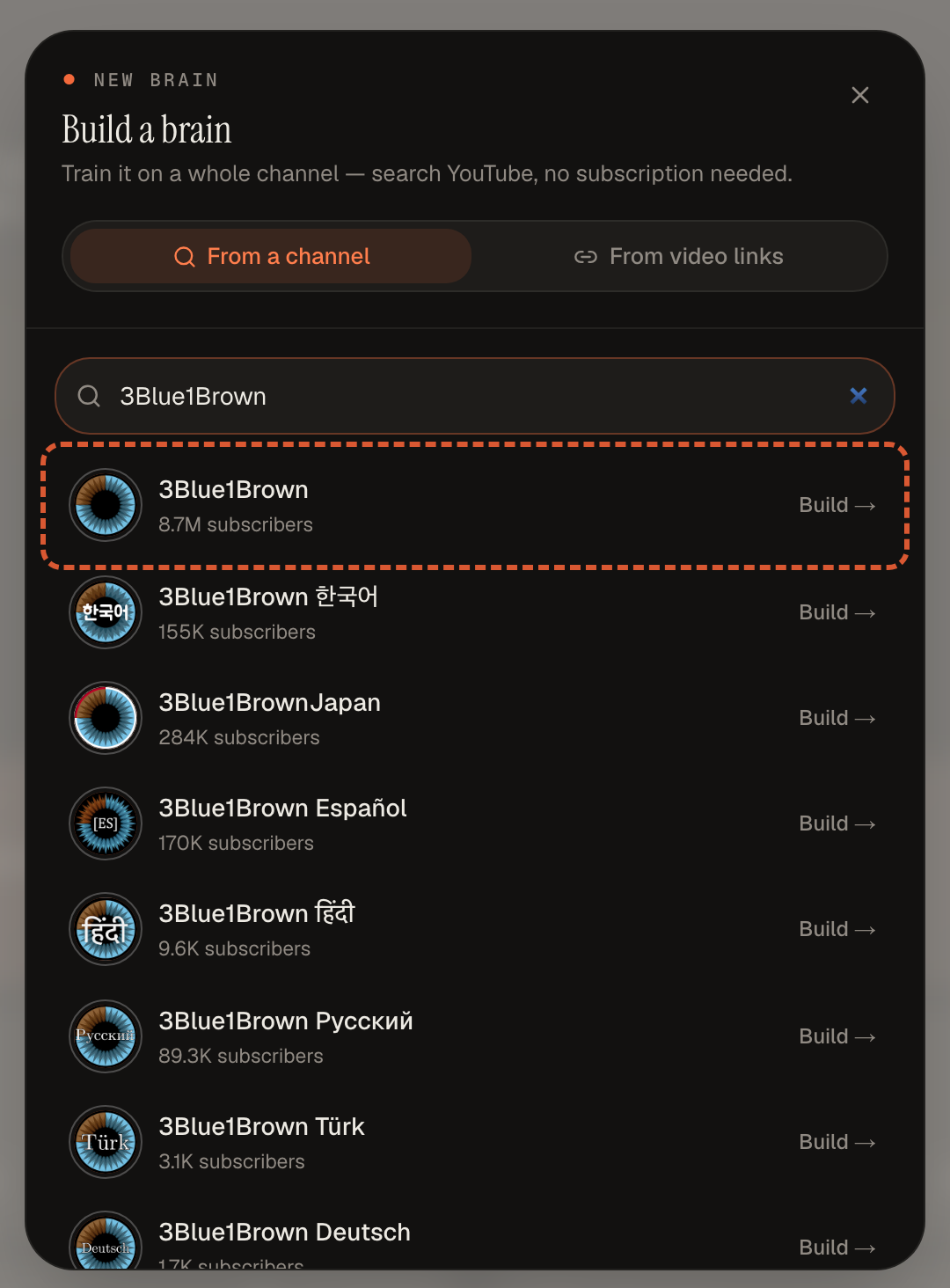
Type the creator's name and press Build next to the right channel.
2. Pick the videos
A list of the channel's videos opens, newest first. Tick the ones you want searchable, or press Select all to take everything loaded, then Add to brain. There's a Load more button at the bottom for a channel's older uploads. We ticked the newest 20 of the 153 videos TubeCortex had loaded.
There's one more switch here worth knowing: Auto-update this brain. TubeCortex leaves it off unless you turn it on, and then it adds each new upload to the brain by itself, so a channel you follow stays searchable without a rebuild. It's separate from Autopilot: it makes the new upload searchable, it doesn't summarize it.
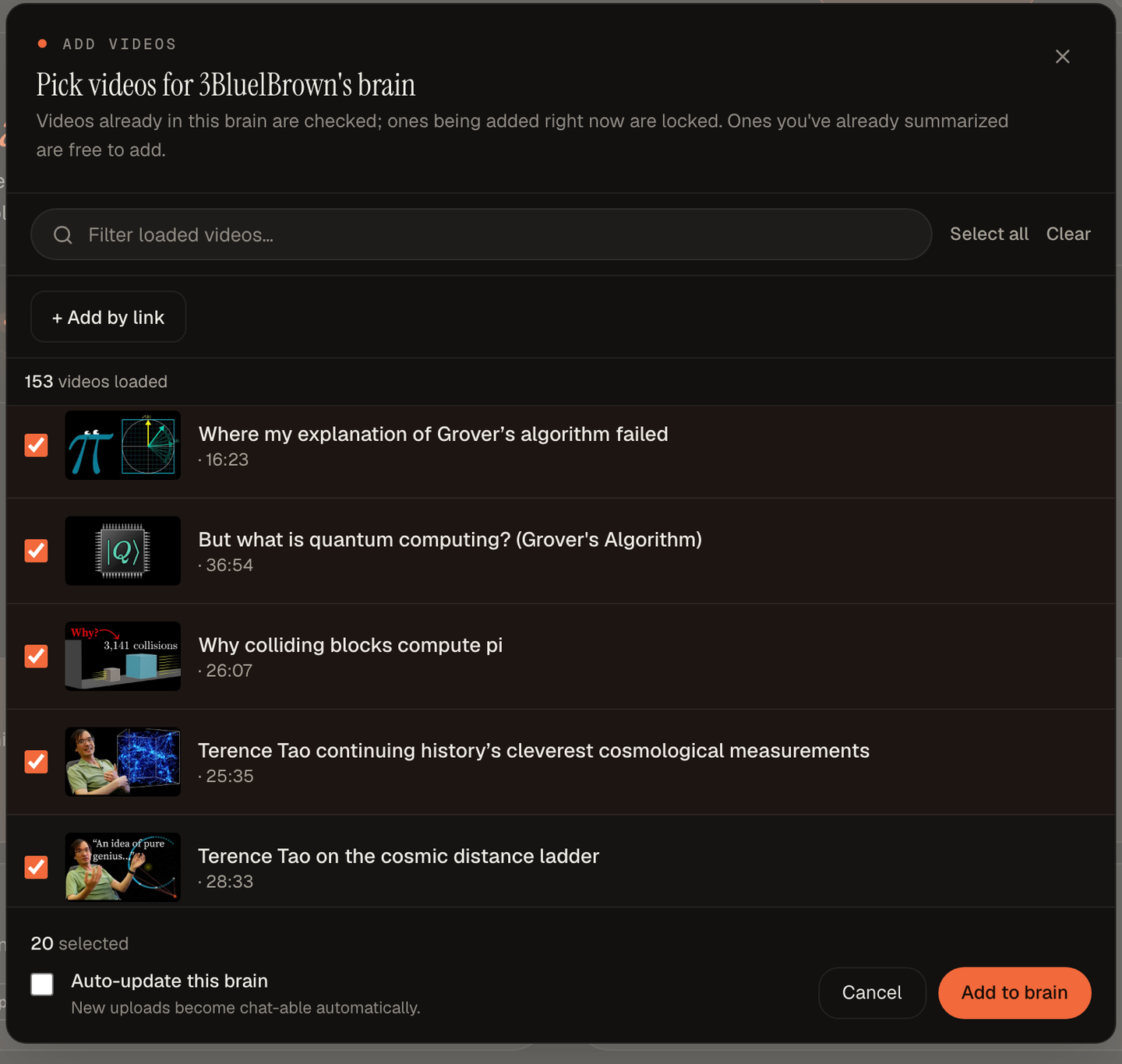
Tick the videos you want and press Add to brain.
3. Let it read the captions
TubeCortex now fetches each video's captions and files them so they can be searched. This is hands-off, and you can close the window. Building a TubeCortex brain makes the videos searchable; it doesn't write summaries. Our 20 videos, about 11 hours of talking that TubeCortex had never fetched before, were done in eight seconds, and the build cost 77 credits. No cost is shown before you confirm, and a bigger pick costs more and takes longer.
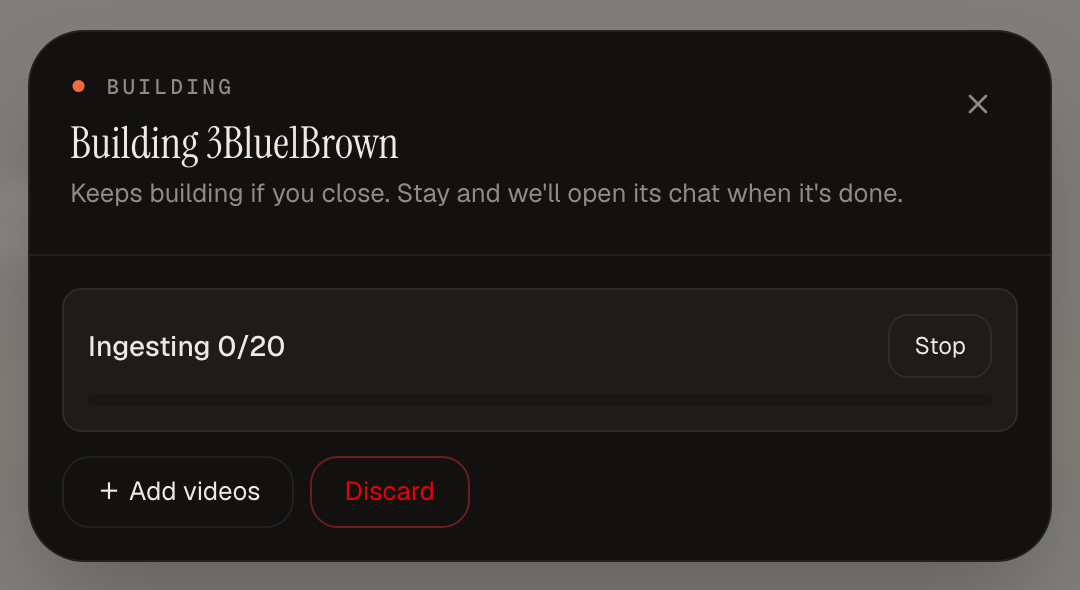
The build runs on its own. You can close this and come back.
4. Ask where it was said
When the build finishes, TubeCortex opens the brain's chat on the Ask page (if you've wandered off, open it from the Brains page). Ask the way you'd ask a friend who has watched the whole channel: "Where does he explain the link between entropy and compression?" TubeCortex's answer names the video and carries a timestamp on each point it took from the captions. Click a timestamp and the video plays from that second without leaving the chat.
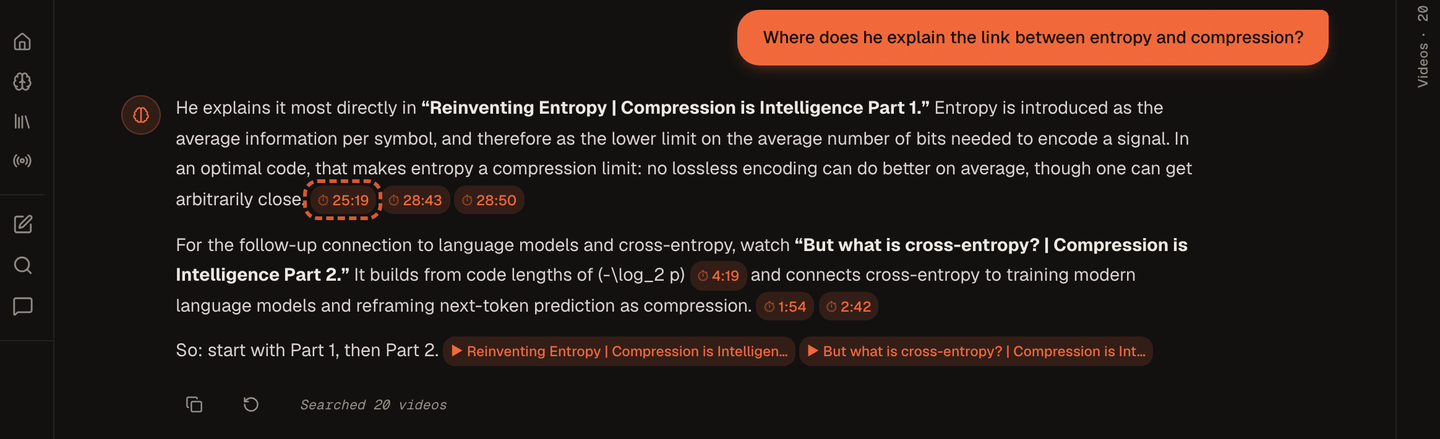
Each timestamp is a button. Click one and the video plays from that moment.
That's the whole job: one question, the right video, the right minute, and no scrubbing.
What YouTube's own search can and can't do
YouTube's search bar is good at finding a video. Google's own page on how YouTube search works says relevance comes from "how well the title, tags, description, and video content match your search query." What it gives you is a video to open, not the minute inside it.
For one video, YouTube does have a transcript panel. Open the description, press Show transcript, and use your browser's find box (Ctrl+F, or Cmd+F on a Mac) to jump to a word. It works, but only one video at a time, and only for the exact word you typed. TubeCortex's free transcript tool does the same job for a single video with a Search inside box and no account.
A whole channel is a different problem. Nobody wants to open 20 transcript panels and press Ctrl+F in each. That's the gap a brain fills.
How a channel transcript search actually works
Here's what happens between your question and the timestamp, in plain words.
Where the answers come from
Every video with captions carries its own words as text. When you build a brain, TubeCortex reads those captions and files every passage with a note of which video it came from and when it was said. Think of the index at the back of a textbook: it doesn't rewrite the book, it just records where each idea lives. The brain is that index, built for a channel. It needs captions to exist; the audio itself is never read.
Why points carry a timestamp
When you ask a question, TubeCortex looks for the passages that fit it, then writes an answer from them. Each point it takes from the captions keeps its note, and that note becomes the timestamp button you see. In our test the first button read 25:19. Clicking it played "Reinventing Entropy" from 25:19 in a panel next to the chat, which is where he defines entropy as the average information per symbol.
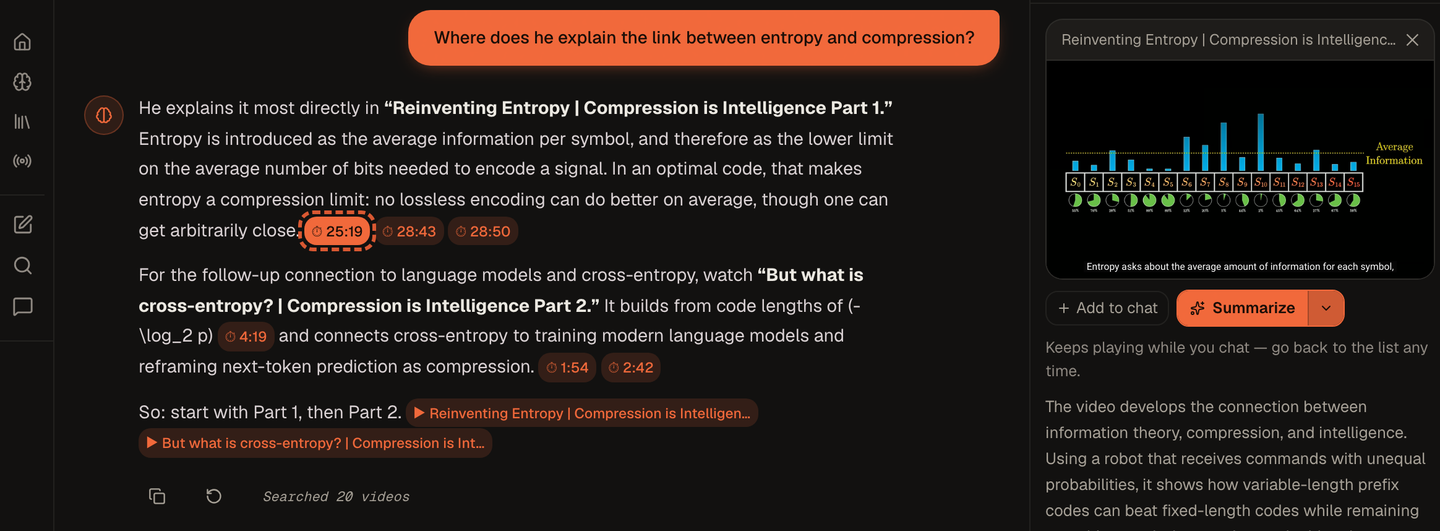
Clicking 25:19 opens the video at that second, beside the chat.
Two honest details. A point about a whole video can cite the video without a time. And if the videos don't cover your question, TubeCortex can add a clearly labeled general answer with no citation at all, so you always know which sentences came from the channel.
It searches by meaning
Ctrl+F finds the exact word you typed. A TubeCortex brain looks for the idea. Our question said "link between entropy and compression," and the answer found the passage it summed up as entropy being "the lower limit on the average number of bits needed to encode a signal," with no word link anywhere in it. In a channel brain, TubeCortex also runs a plain word match alongside the meaning search, which helps when you remember the exact term. If you want the longer version of how this works, read how AI summarizes and answers from video.
Several channels at once
A TubeCortex channel brain holds one creator. To search two to five creators in one go, build a brain for each and tick several on the Ask page; TubeCortex answers from all of them and still cites each video. For hand-picked videos from different channels, use From video links instead, as in turning five videos into one answer.
What this looks like in practice
Say you watched 3Blue1Brown's video on Grover's algorithm months ago, you half-remember he later said he'd gotten something wrong, and your quantum computing assignment is due Friday. The two videos run 36:54 and 16:23, about 53 minutes together.
We asked the brain: "Did he ever explain what went wrong in his first Grover's algorithm video?" Eighteen seconds later it answered yes, with seven timestamps. The main point: his first video made the "phase flip" look as though the computer must already know the right answer, and the fix is that the algorithm starts from a classical verifier (the example the answer gives is a program that checks a Sudoku grid without knowing the solution). The button for that passage reads 20:31.
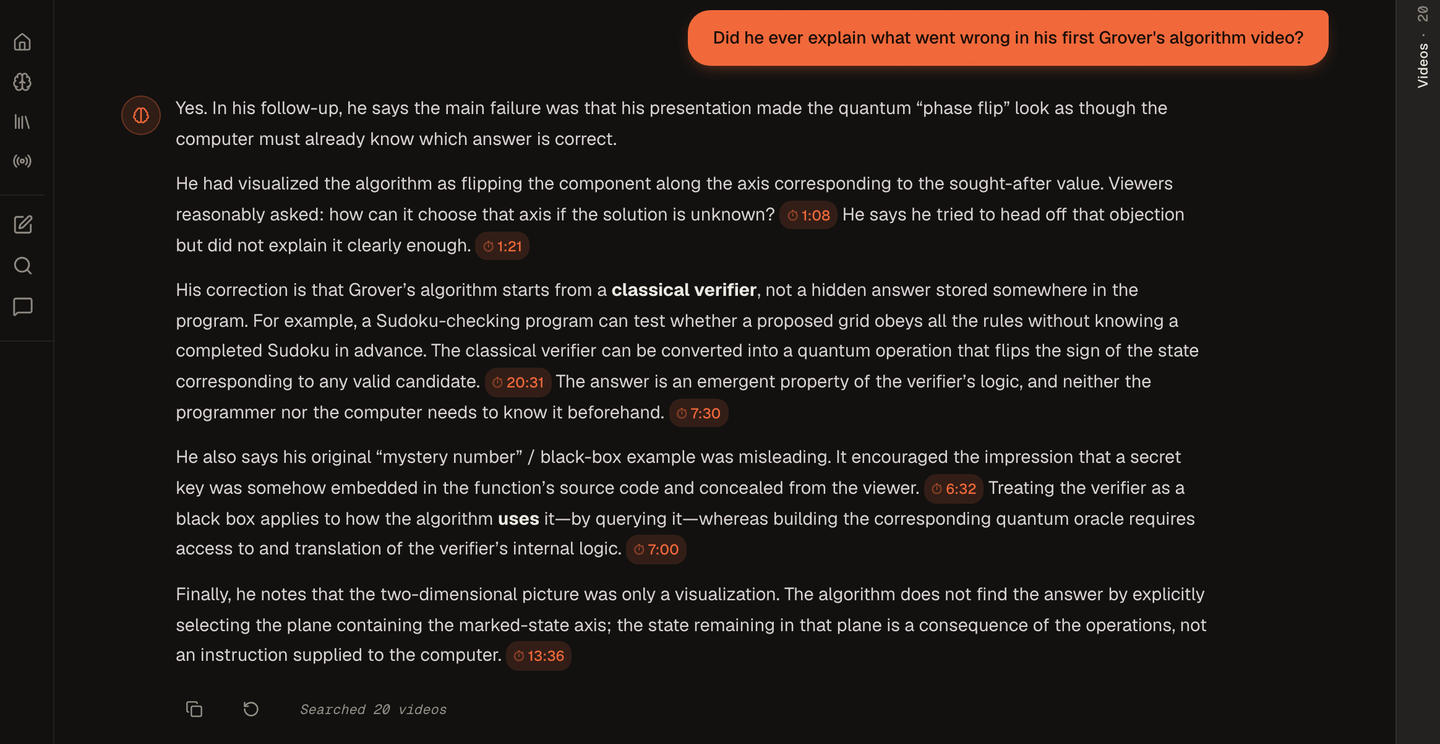
One question, seven timestamps, and both videos named.
Here's the arithmetic. Rewatching both videos to find the correction is 53 minutes. One question took 18 seconds, plus the eight-second build. Then you watch only the moments it points at, and skip the rest of the 53 minutes. You still watch the good part. (Honestly, step 4 is the one that changes how you use a channel.)
Everything we measured in this post comes from one run on October 21, 2026: one channel, the newest 20 of its 153 loaded videos, one build and two questions, on a development copy of TubeCortex. Your numbers will differ with the channel and the pick.
Who else searches a channel this way
This guide is written for students, but a TubeCortex channel brain does other jobs too:
- Researchers can find the passage to quote, keep the minute as the reference, and check the words against the video.
- Creators can find the video where they already explained something before filming it again.
- Marketers can check what a competitor's channel actually claimed, and when.
What a channel brain can and can't do
Note: TubeCortex needs captions. A video without captions or a transcript can't be searched, however clear the speech is.
Note: Building a brain and asking it questions needs a Google sign-in. Building spends credits, with no cost shown before you confirm, and so does asking unless you pick TubeCortex Free in the chat's model menu, which spends none. New accounts start with 2,500 free credits, no card needed.
Note: A TubeCortex channel brain holds one creator's videos. It searches the videos you ticked, not the ones you left out, and new uploads join only if Auto-update is on.
Note: TubeCortex puts a timestamp on points taken from the videos, but not every sentence is cited: a point about a whole video has no time, and a question the videos don't cover can get a labeled general answer.
Note: The words are YouTube's captions, exactly. Automatic captions can get a word wrong, so check names and numbers before you quote them.
Frequently asked questions
Can I search a YouTube channel for a specific word someone said?
Yes, with a TubeCortex brain: build one from the channel, then ask for the word or the idea in plain English, and the answer names the video and the minute. A brain searches by meaning, and TubeCortex runs an exact-word match alongside it. For one video, YouTube's Show transcript panel plus Ctrl+F does the same.
Does YouTube have a channel transcript search built in?
Not that YouTube's own help pages describe: they cover a search that finds videos by title, description, tags and content, and a transcript panel for one video at a time. To search what was said across a channel, you need a tool that reads the captions of many videos at once, which is what a TubeCortex brain is.
Do I have to add every video on the channel?
No, the picker lets you tick only the videos you want, or Select all for everything loaded, with Load more for older uploads. You can add or remove videos later from the Brains page, and Auto-update can add new uploads on its own.
How accurate are the timestamps?
In our test the one we checked matched: clicking 25:19 played the video at the moment entropy is defined. Each timestamp comes from the captions the answer drew on, and the words themselves are YouTube's captions, so check names and numbers before you quote them.
Is it free?
TubeCortex gives new accounts 2,500 free credits (dozens of full-length summaries), no card needed. In our run, the 20-video brain cost 77 credits to build and the first question 28, so the free credits covered the brain and both questions with most of them left. Questions asked on TubeCortex Free spend no credits at all, though building the brain always does. Sign up free to build your first brain.
Recap
A YouTube channel transcript search with TubeCortex is four steps: find the channel, tick the videos, let it read the captions, ask. You get the video and the minute instead of a list of thumbnails, and clicking a timestamp plays the moment next to the chat. The build is a one-time job (eight seconds in our test); after that, both of our questions took about 18 seconds each.
If there's one channel you keep rewatching to find a passage, build a brain from it, free, and ask it where the thing was said.