1 Nov 2026 · TubeCortex
TubeCortex Credits: 8 Tips and the One Myth We Tested
TubeCortex credits pay for summaries, chat answers, and brain builds. Eight tips to spend less, plus the one saving myth we checked in our own test runs.
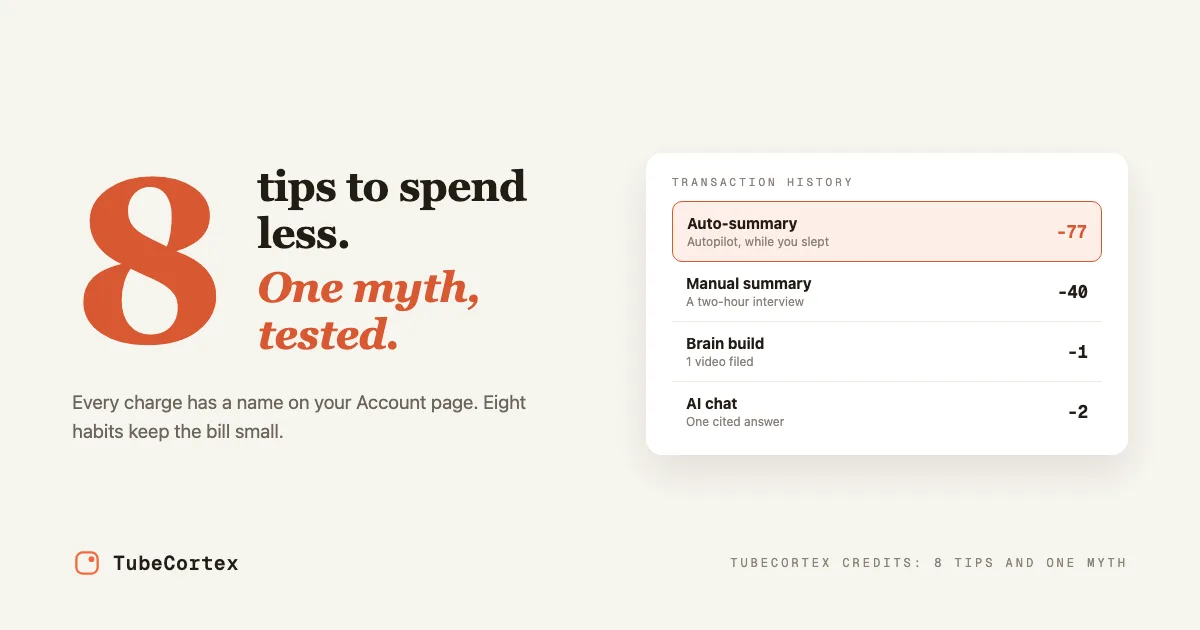
TubeCortex credits are spent on four things, and your Account page names every one: a summary you run, a summary Autopilot runs for you, a chat question, and each video you add to a brain, unless it's already in your account. Nothing else charges you. A web search you add to a question is paid for inside that question's chat charge. Reading a summary you already have is free, searching your Library is free, and summaries and chat on TubeCortex Free are free. So when a balance drains faster than you expected, it's one of those four, and the fix is usually one click. This guide shows you what makes each one cost more, where to see it, and eight tips that stretch a balance, plus the one saving myth we checked in our own test runs.
At a glance
| Aspect | Detail |
|---|---|
| What spends credits | Four things: your summaries, Autopilot's summaries, chat questions (web searches included), and adding videos you don't already have to a brain |
| What's free | Reopening summaries you already have, searching your Library, and summaries and chat on TubeCortex Free |
| Biggest single saving | Move routine work to TubeCortex Free, which never spends credits |
| What drives the bill | How long the video is, and which tier you picked |
| What barely matters | Which summary format you picked. We measured it in our own test runs |
| Where to check | Your Account page, where your recent charges are listed by type |
| Free to start | Create a free account. 2,500 free credits, no card needed |
What actually spends credits
Every charge lands on your Account page under one of four names, one for each of the four things above. A fifth name, Web search, can show up too, but it isn't a separate charge. Learning the names is most of the battle, because the page then tells you exactly where your credits went.
| On your Account page | What it is | What makes it cost more |
|---|---|---|
| Manual summary | A summary you asked for yourself, including one you took from a shared link with "Get this summary" | A longer video, and a heavier tier |
| Auto-summary | A summary Autopilot wrote when a channel you watch posted something new | The same, multiplied by every upload that gets through |
| AI chat | One question and the answer it got, whether you asked one video, a brain, your Library, or several channels at once | How much video the answer has to read, the tier you picked, and a web search if you added one. Most questions cost little, a deep answer over long videos costs more |
| Brain build | Adding videos to a brain so you can ask across them, by hand or through Auto-update | How many videos you add that aren't already in your account |
| Web search | A marker that one of your questions also searched the open web | Nothing on its own. The search is paid for inside that question's AI chat charge, and this line reads "included" |
Two of the four are worth staring at. Auto-summary is the big one that spends while you're asleep. (Auto-update does too, in small Brain build charges.) And Brain build charges per video, so adding a 200-video channel you've never summarized deserves a moment's thought.
How to spend less: tips 1 to 4
Tip 1: Look at where your credits actually went
Open Account. Your credit balance is at the top, and beside it (below it on a smaller screen) is your Transaction history: your most recent charges and top-ups, newest first, each charge labeled with one of the names above. "Export spreadsheet" lets you download the whole history. Once the list has grown a bit, filter chips appear too, so you can look at just top-ups, just summaries, or just the chat and brain rows. Do this before you change anything else, so the line you fix is the one that's actually big.
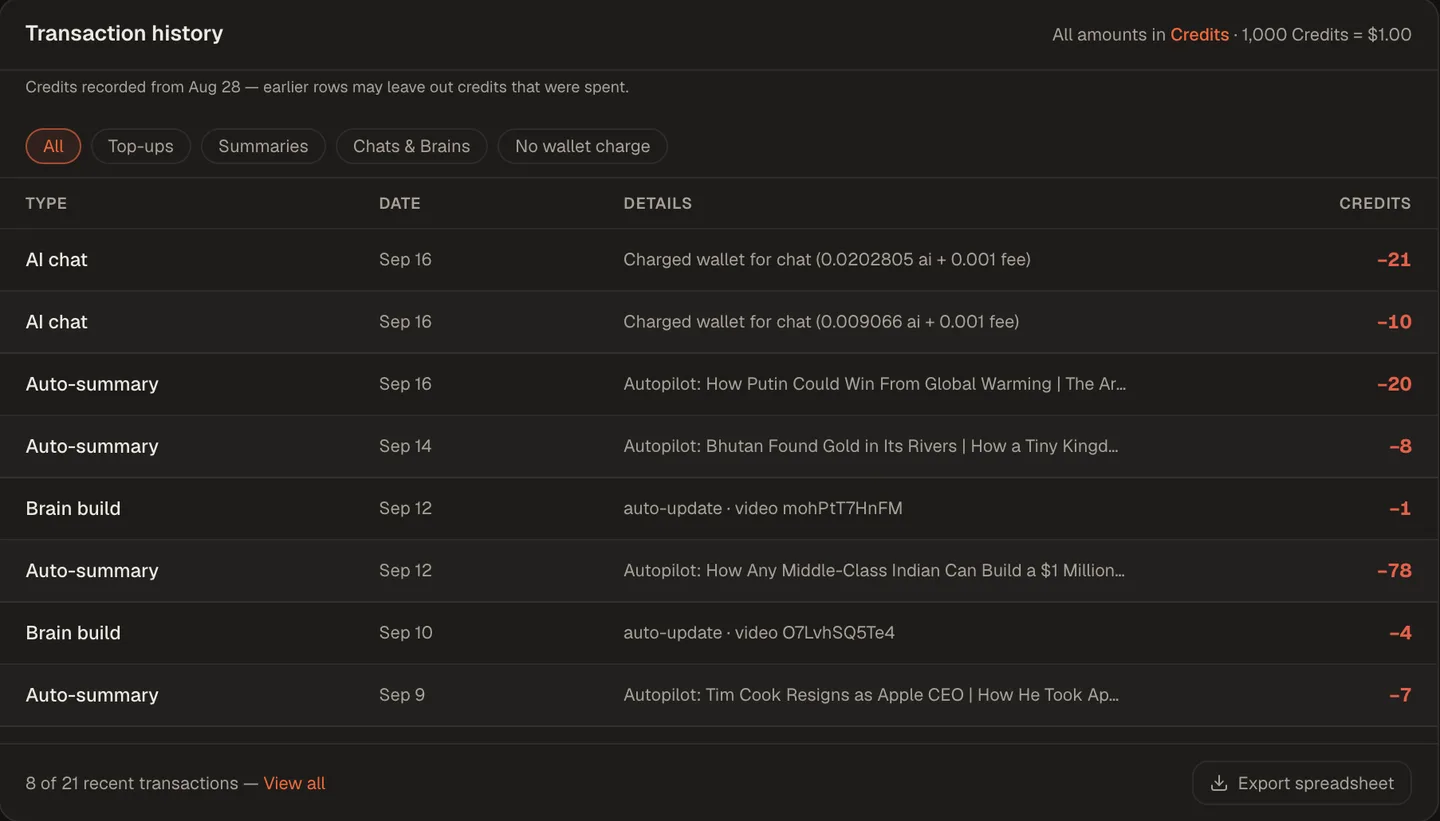 The Account page's transaction history. Every charge is labeled by type, so you can see at a glance whether summaries, chat, or brain builds are draining your balance.
Tip 2: Move your routine work onto TubeCortex Free
Under the paste box on the home page, open the AI picker (labeled "Which AI writes it" on a fresh account). Below Quick, Balanced, and Think Deeper sits a row with a gift icon: TubeCortex Free, and the line under it reads "Free · never spends credits". Pick it, and your summary costs nothing at all. The chat has the same menu, so your questions can be free too.
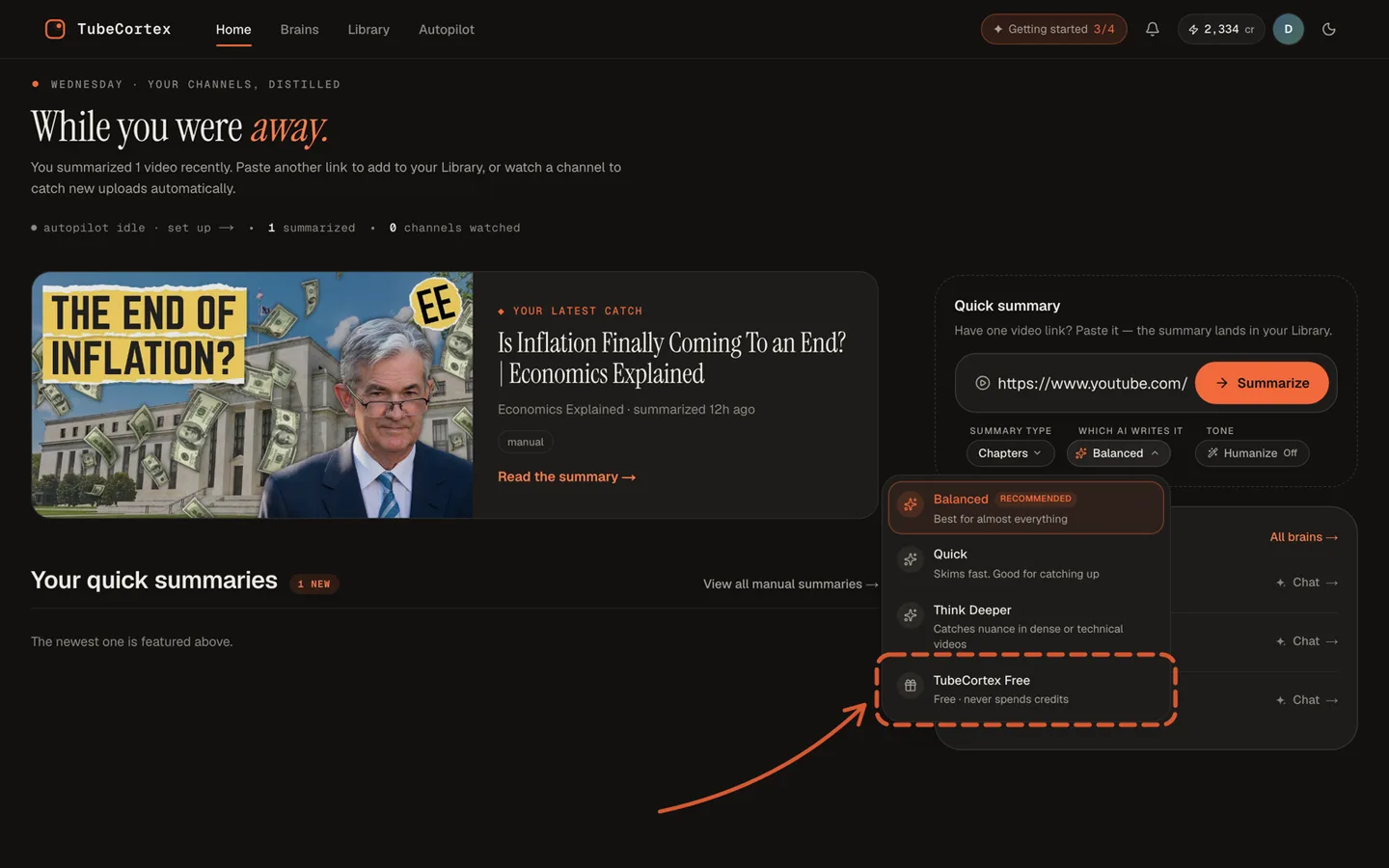 The AI menu on the home page. The bottom row is TubeCortex Free, and its line reads "Free · never spends credits".
This is the single biggest saving there is, and it has its own guide. The short version: keep the everyday catch-up on TubeCortex Free, and spend credits only on the videos that deserve a stronger AI.
Tip 3: Tell Autopilot what you actually care about
On the Autopilot page, find the Interest mode panel and switch it from "Everything" to "Only topics", then add a few topics in your own words. Autopilot then summarizes the uploads that match and skips the rest, and a skipped upload costs nothing at all. The page says as much itself: Autopilot "summarizes what matches your interests, skips the rest".
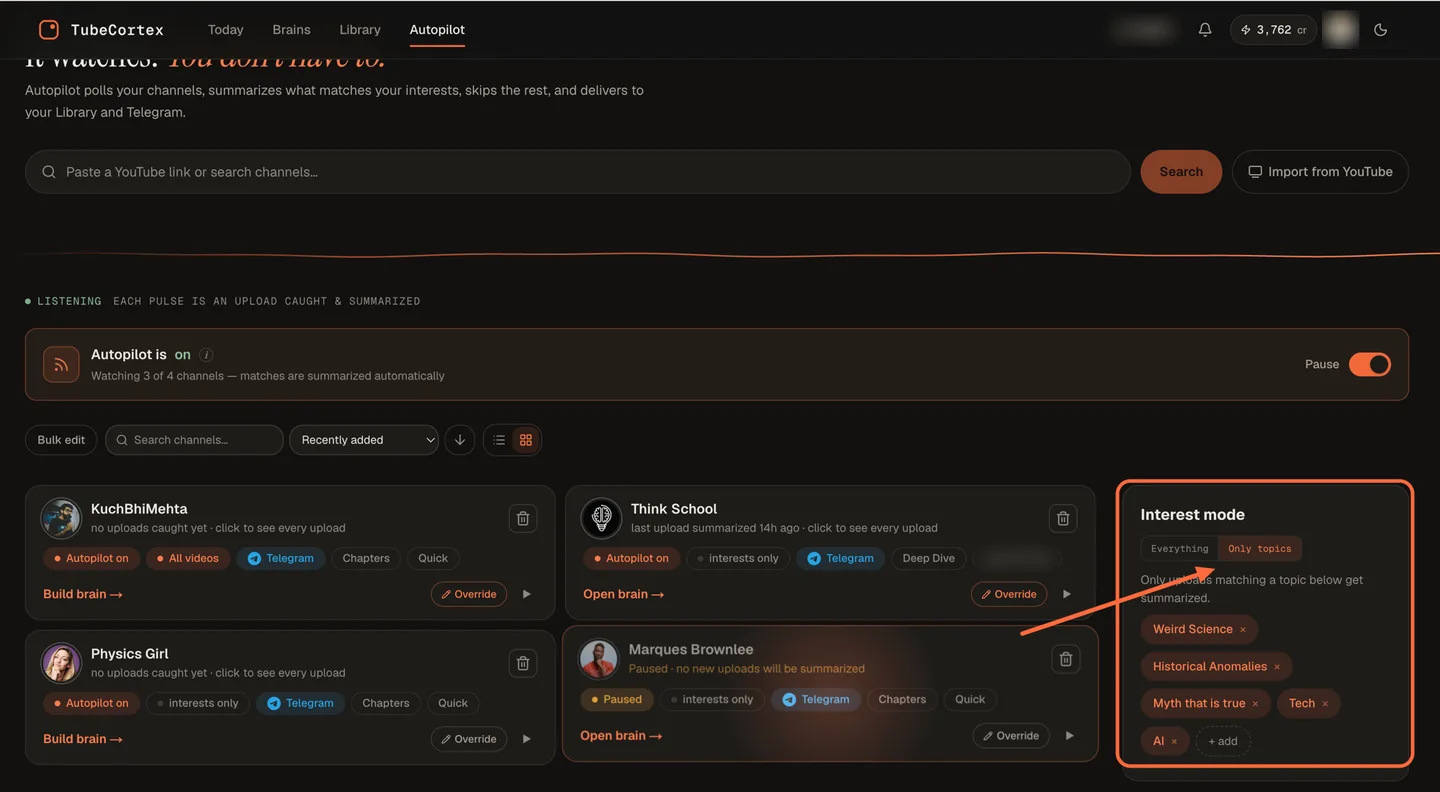 The Autopilot page's Interest mode panel, set to "Only topics". Only uploads that match your topics get summarized. The rest are skipped, for nothing.
Note: Autopilot never runs on TubeCortex Free. Automatic summaries always use a paid tier. When your balance is empty, Autopilot stops summarizing instead of switching to the free engine, and any upload that arrives before you top up is skipped for good. It won't be summarized later. That's why interests are worth setting: they cut what Autopilot spends without turning it off. Keeping Autopilot on Quick, its default tier, helps too.
Tip 4: Ask your Library before you build another brain
Every video you summarize is kept in My Library, and the "Chat with your library" button answers from all of it. Same kind of answer, each one pointing at the exact minute of video it came from. That costs one chat charge. Building a brain, by contrast, charges for every video in it that isn't already in your account. So if what you want is an answer, ask first. (There's a full guide to asking questions across YouTube videos.) Build a brain when you want to keep coming back to the same set of videos.
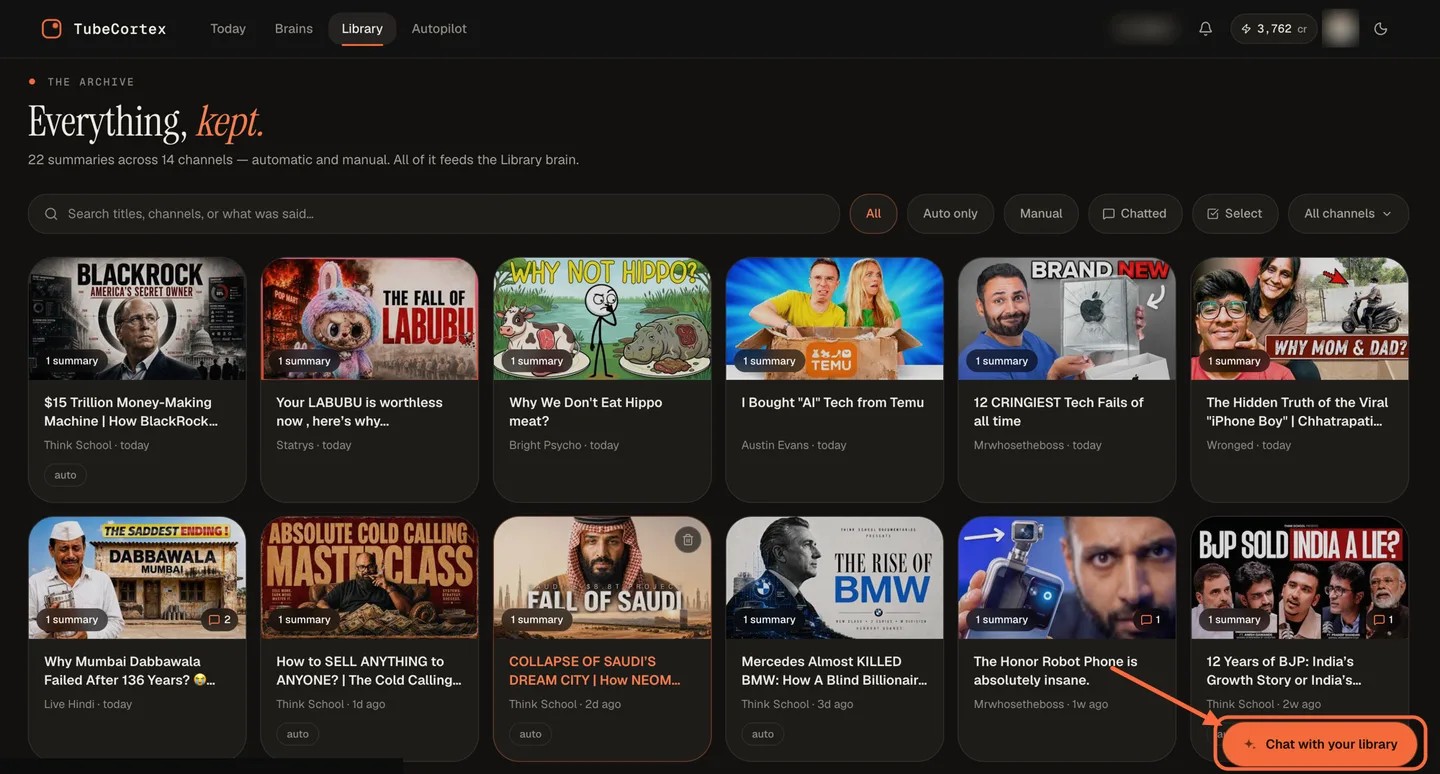 The Library keeps every summary you've made. The highlighted "Chat with your library" button asks across all of it for a single chat charge, with no brain build involved.
Do those four and the bill drops without you giving up anything you were using. If you only do one of them, make it tip 2.
Tips 5 to 8: the habits
Tip 5: Reopen, don't re-run
On a paid tier, summarizing a video you've already summarized is a fresh charge every time. TubeCortex does warn you first: paste a link you already have, and a note under the box says so, with a link to open the copy you have. The old summary is still in your Library and costs nothing to reread. If you want a different angle on it, ask a question about it instead of running a second summary.
Tip 6: Summarize first, build the brain second
Once your account has a video, adding it to a brain later is free, and that works even when the first summary was a free one. So a backlog you cleared on TubeCortex Free costs nothing to add when you build a brain later.
Note: a video that's new to your account always costs credits to add to a brain, whichever AI you pick, TubeCortex Free included. Chatting with the finished brain on TubeCortex Free costs nothing.
Tip 7: Watch a channel into its brain instead of summarizing every upload
Two settings watch a channel for you, their names sound alike, and they cost very different amounts. Keep them apart:
| Autopilot | Auto-update | |
|---|---|---|
| What it does with a new upload | Writes a full summary of it | Files it into that channel's brain, so you can ask about it |
| What one upload costs | The full summary bill. The big rows in the history under tip 1 | A small filing charge, a few credits per video |
| Pick it when | You want to read what's new | You only want to ask about what's new |
If you mostly ask rather than read, Auto-update is the better setting. It isn't free, and the Add to brain panel on a video says so when it offers the switch: "this costs credits per upload". You can see the gap in the transaction history under tip 1: the Auto-summary rows there run 7 to 78 credits each, while each Brain build row, one new upload joining a brain, costs 1 to 4.
Tip 8: Use the web-search button  on purpose
A chat question answered from your own videos is one AI chat charge. Tap the little globe button in the chat box, and your next question can search the open web too. The search goes on that same AI chat charge, so the question costs more. Your Account page then adds a Web search line marked "included", just so you can see the search happened. On TubeCortex Free the globe is grayed out, because web search only works on the paid tiers.
There's one moment that's worth paying for: when you don't want to take a YouTuber's word for something. Creators fuel their share of myths, and sending that one question to the web checks the claim against the wider internet before you act on it. So the habit is simple: tap the globe for the question where you're double-checking a claim, and leave it alone for everything else. It switches itself off after each message, so it can't run up a bill in the background.
One thing to know: asking in words works too. On a paid tier, a question like "search the web for this" or "look it up online" goes to the web as well, so only phrase it that way when you mean it.
A bonus move: the zero-credit channel brain
Here's the play for the day your balance hits zero and you still want a channel you can ask questions about.
Summarize a handful of that channel's videos on TubeCortex Free, one at a time. It costs nothing, and each one lands in your Library. Now press "Chat with your library" and ask, with TubeCortex Free picked in the chat too. The answers draw on those videos, so what you have behaves a lot like that channel's brain. Built for zero credits, used for zero credits.
Two honest caveats. Library chat searches everything you've saved, so a big Library can mix other videos into the answer. On a computer you can narrow it: in the video list beside the chat, press "Add to chat" on that channel's videos, and the answers stick to just those. And pasting videos one at a time is fine for five or ten, tedious for fifty. For a small channel, or just the few videos you actually care about, it works today.
And when you do top up and build the real brain, every video you summarized this way goes into it free.
The one myth we tested
The obvious guess is that a shorter summary format costs less, so you should pick Chapters over Deep Dive to save money.
We checked in our own test runs: 2,052 summaries our team ran on our test database between May and August 2026. The fairest comparison in that pile was a small one: 34 paid summaries on a single engine, with videos of about the same length. There, Chapters wrote 53% of what Deep Dive wrote and cost 12% less. Half the words. An eighth off the price.
Here's why. The video's transcript (the written copy of everything said in it) is what the AI reads either way, and that reading is most of the bill. The summary is the small part on the end. So pick the format for what you want to read. It won't move your bill much.
The same fact points at what does matter: video length. A two-hour interview costs several times what a ten-minute update costs, on any paid tier and in any format, because there's several times more to read. The cheap habit is to run the long ones on TubeCortex Free unless they're important. (If a video is ever too long for TubeCortex Free, it tells you, and you can pick a paid tier.)
What this looks like in practice
Say Autopilot watches eight channels for you, and over three weeks they post 22 videos.
With interests off, Autopilot writes 22 paid summaries, whether or not you read them. With interests set to the four subjects you actually work on, it writes maybe seven and skips the other fifteen for nothing. Of those seven, one is a long interview that touches a real decision, so you rerun that one on Think Deeper and ask your follow-up questions there.
The bill: eight summaries, plus those follow-up questions. Seven summaries that Autopilot wrote, plus the deliberate Think Deeper rerun of the interview, because an upgrade is a fresh charge, exactly as tip 5 warns. The other fifteen uploads cost nothing. And they aren't lost. Paste any of them in yourself later and summarize it on TubeCortex Free, for nothing.
A quick note for different people
- Students: summarize lectures on TubeCortex Free as they come out. Any brain you build from them later adds those videos free.
- Solopreneurs: interests are your budget control. Four sharp topics beat twelve vague ones.
- Creators: watch rival channels with Auto-update rather than Autopilot, since you mostly want to ask, not read.
What this can and can't do
Note: TubeCortex only works on videos that have captions or a transcript available. No tier or setting gets around that.
TubeCortex charges you what the AI provider charged for the job, converted into credits, plus a small fixed fee per job. That's why the same video can cost slightly different amounts on different days, and why there's no fixed price per summary. You always see the real number afterwards on your Account page.
TubeCortex Free has daily limits on free use, set well above a normal day's use, and they reset at midnight UTC. It also isn't a guarantee: the team can switch TubeCortex Free off for maintenance.
Frequently asked questions
What uses the most credits in TubeCortex?
Autopilot's automatic summaries, summaries of long videos, deep chat answers on the stronger tiers, and adding a big channel to a brain are the heaviest jobs in TubeCortex, and your Account page shows which one is biggest for you. Autopilot is the big one that runs unwatched, on new uploads from the channels it watches, whether you read them or not. Brain builds charge for every video that's new to your account, so adding a big channel adds up.
Does a web search cost extra in TubeCortex?
Yes, a TubeCortex question that also searches the open web costs more than one answered only from your videos. The extra is added to that question's AI chat charge, and your Account page shows a Web search line marked "included" so you can see it happened. The globe button switches itself off after each message, and web search isn't available on TubeCortex Free.
Do I get charged again if I summarize the same video twice?
Yes, on a paid tier a second summary is a second charge, even on the same video. The first summary is still in your Library and costs nothing to reopen, and TubeCortex shows a note pointing you to it when you paste a link you already have.
Does picking a shorter summary format save credits?
Picking a shorter format saves very little: in our own test runs, Chapters cost only 12% less than Deep Dive while writing about half as much. That comparison used paid summaries on the same engine, with videos of similar length. The AI reads the video's full transcript whichever format you pick, and that reading is most of the bill. Pick the format you actually want to read.
What happens when my TubeCortex credits run out?
When your TubeCortex credits run out, the paid tiers (Quick, Balanced, and Think Deeper) lock until you top up. Autopilot stops summarizing too, and new uploads that arrive before you top up are skipped, not saved for later. You can still run summaries yourself and chat with your brains and Library on TubeCortex Free.
Can I use TubeCortex without spending credits at all?
You can use TubeCortex day to day without spending credits, because summaries and chat on TubeCortex Free cost nothing. Two things always charge, on every engine: Autopilot's automatic summaries, and adding videos that are new to your account to a brain. Videos you already summarized go into a brain free. Start free and see how far that gets you.
The short version
TubeCortex credits go on four things, and your Account page shows every one of them by name. Put the routine work on TubeCortex Free, tell Autopilot which topics you care about, reopen instead of re-running, and ask your Library before you build a brain. That's most of the saving, and none of it costs you anything you were actually using. Check your Account page and find your biggest line.